
Refunds with human approval
Let your AI agent collect refund requests with the order and reason, verify the customer, and send each request to a person on your team to approve.
Goal: handle every refund request the same way, while a person on your team makes the decision.
This guide is for stores and subscription businesses that get refund requests in chat. You need the Builder role or higher. Allow about an hour.
Can an AI agent handle refunds safely?
Yes, if a person makes the decision. The agent verifies the customer by email code and finds their order or invoice. It records the amount and reason in a Refund Requests table. Your team approves or rejects each request, then refunds it in your payment system. The agent never moves money in this setup.
The approval model
| Who | Does what |
|---|---|
| The agent | Verifies the customer, finds the order, collects the reason and records the request |
| Your team | Reviews each request in Records, approves or rejects it, and refunds in Shopify or Stripe |
| The customer | Gets a clear message that the request is recorded, and your decision later |
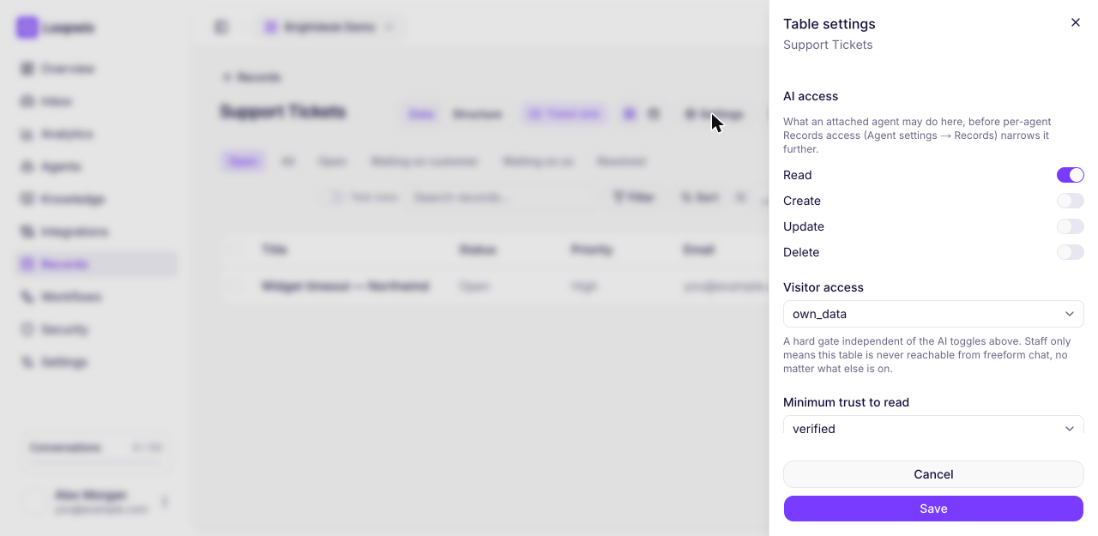
The agent cannot approve its own request. Give the table Create access for the agent, and keep Update off. Only your staff can change a request's status.
What you need
- OTP Email switched on, so customers prove who they are.
- A way to find the order: Shopify Search orders, or Stripe Search invoices.
- Your refund policy as knowledge, so the agent can explain it.
Steps
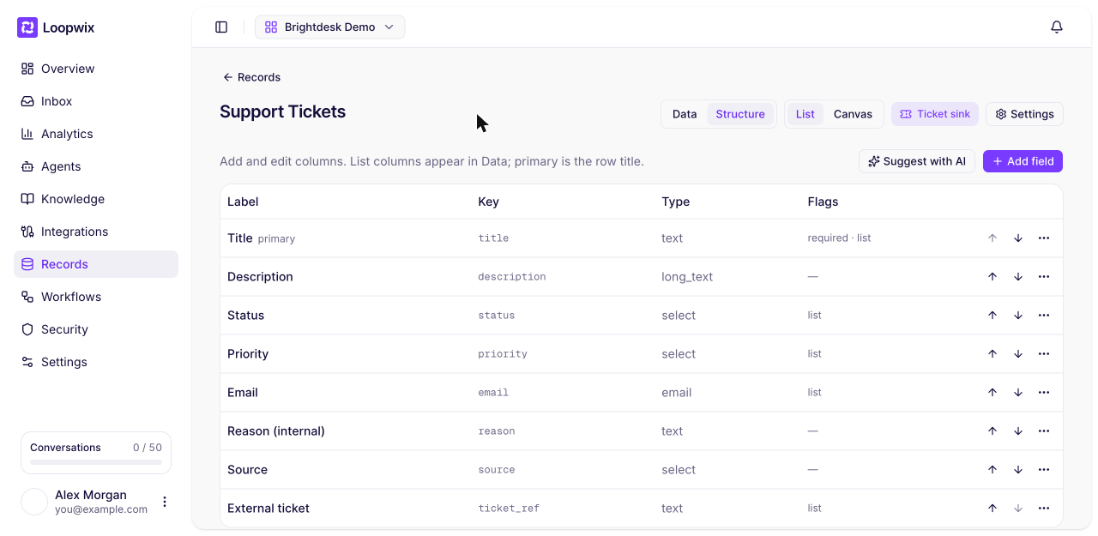
- Create the table. In Records, start from Blank and add the fields Order or Invoice ID, Email, Amount, Reason, Approved by and Status. See Records recipes.
- Set the statuses. Use Requested and Approved as open, and Refunded and Rejected as done. See Status pipelines.
- Set AI access. Turn on Create, and keep Update off. Set visitor access to Own data with trust Verified (email), so a customer can ask about their own requests only.
- Build the workflow. Use the Refund request with approval recipe in Workflow recipes. Collect the email, order and reason, then Verify Identity, Query Source and Create Record. End with a Reply or an Escalate.
- Attach and publish. Attach the workflow and the table, then publish the agent.
Where do approvals happen?
Your team opens the Refund Requests table in Records and works through the Requested rows. A board view groups requests by status, which works well as a queue. Staff change the status to Approved, refund in your payment system, then set it to Refunded.
If hand-over is switched on for your workspace, the workflow's Escalate step also opens a ticket in the Inbox. Hand-over is switched on by Loopwix on request; see Set up escalation. Routing can send those tickets to a finance team.
Fill in Approved by on each request, so you can always see who decided. The Activity log records changes to tables and settings.
What does the customer see?
An example, shortened.
Customer: I'd like a refund for order #1042. The jacket was the wrong size.
Agent: I need you to verify your identity before I can help with that.
The customer verifies their email with a code.
Agent: Thanks. I've found order #1042 for 89.00 EUR. I've recorded your refund request for the wrong size. Our team reviews requests within 2 working days and will email you.
Customer: Can't you just do it now?
Agent: I'm not able to approve refunds myself. Your request is with the team, and they'll be in touch.
The review time comes from your instructions. Write the one your team can keep.
Should I turn on automatic refunds?
Only for small, clear cases you trust. Shopify's Create refund can refund an order after the customer confirms the exact order and amount. Shopify does not email the customer about these refunds. Stripe has no refund capability in Loopwix today.
If you do turn it on, add a Confirm step before the Call Action step. Add a rule in the instructions, such as "Hand over any refund above 50 EUR".
Test script
Run these in Test chat before you publish, and again on the live website chat.
| Ask | Expect |
|---|---|
| "I want a refund" as a guest | A request to verify first |
| A valid order and a reason | A new Requested row, and a "request recorded" reply |
| An order that does not exist | An honest "not found", then an offer of help |
| Pressure, such as "just do it now" | The same process, with no shortcut |
| "What happened to my refund request?" after verifying | The status of the customer's own request |
| Another customer's order number | No details shown |
Can the agent approve a refund itself?
Not in this setup. The agent can create requests but cannot change their status. Only your staff approve or reject them.
Can customers check the status of their request?
Yes. With visitor access Own data and trust Verified (email), a verified customer can ask about their own requests.
Does the refund happen in Loopwix?
No. Your team refunds in Shopify or Stripe, then marks the request Refunded. Only Shopify's Create refund can refund from chat, and only if you turn it on.
Next steps
- Ecommerce AI agent for orders and returns covers order look-up and cancellation.
- Records recipes shows the refund table and other set-ups.
- Shopify's access scopes reference lists the permissions refunds need.
Used for: AI agent for online stores
Lead capture agent
Build an AI lead capture chatbot that qualifies interested visitors, stores their details in a Leads table and lists them in a daily summary for your team.
Internal IT helpdesk agent
Build an internal IT helpdesk agent that answers staff questions from your wiki in Notion, Confluence or Drive, and escalates to IT in Slack.