
Clinic appointment agent
Set up an AI agent for a clinic that answers practical questions and takes appointment requests, and keeps medical advice and health details out of chat.
Goal: answer practical questions and take appointment requests, so reception has more time for patients in front of them.
This recipe is for clinics, dental practices, physiotherapists, vets and other practices. It builds on Build an AI booking agent. You need the Builder role or higher. Allow about an hour, plus a review by someone responsible for patient communication.
How do I set up an AI appointment agent for my clinic?
Add your services, opening hours, prices, insurance details and how to prepare for a visit as knowledge. Write clear instructions: no medical advice, no health details in chat, and your emergency number for urgent cases. Take appointment requests in a Bookings table that staff confirm, or through Calendly. Test it, then publish.
What patients ask a clinic
| Patients ask | Add this to knowledge |
|---|---|
| "Do you take my insurance?" | The insurers and schemes you accept |
| "How much is a check-up?" | Prices, or where to find them |
| "Are you open on Saturday?" | Opening hours and holiday hours |
| "What do I bring to my first visit?" | Documents, forms and when to arrive |
| "Where can I park?" | Address, parking and access |
| "How do I get my results?" | Your process, without any results in chat |
Write safe instructions
Add rules like these to the agent's instructions. Adjust the wording to your practice.
- "Never give medical advice, a diagnosis or an opinion on symptoms. Suggest booking an appointment instead."
- "For anything urgent, say: call 112 or go to the nearest emergency department." Use your country's emergency number.
- "Do not ask for symptoms, medical history or medication. Ask only for name, email, phone, the type of appointment and a preferred time."
- "Never confirm that someone is a patient."
The last rule matters: a question like "is my husband booked in today?" must not get an answer.
Choose a booking mode
Most clinics use Records mode: requests arrive as Pending, and reception confirms them against the practice system. Use Calendly mode only if your clinicians' real availability is in Calendly. See Which booking mode should I use?.
Steps
- Add the knowledge from the table above, then publish it and attach it.
- Write the safe instructions above, and set a calm, formal tone.
- Create the Bookings table from Bookings / appointments. Use the Service field for the appointment type, and keep Notes for practical notes only.
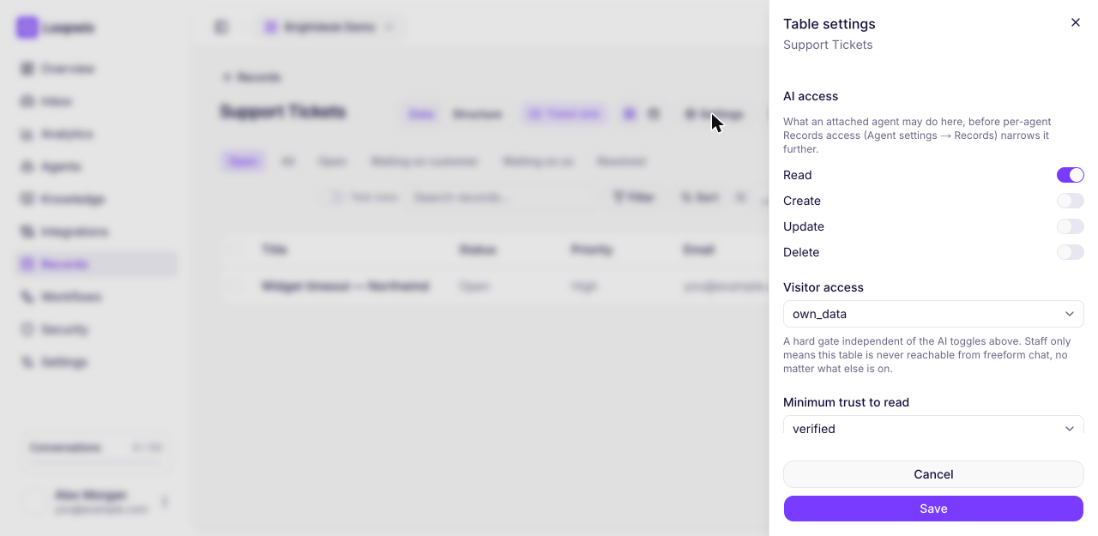
- Set table access. Turn on AI Create. Turn Read off if it is on, so the agent cannot look up other bookings. Keep visitor access Staff only.
- Build the workflow from the Book an appointment recipe in Workflow recipes. Collect only the name, email, phone, appointment type and preferred time.
- Test with your team, then publish the agent.
What does a clinic conversation look like?
An example, shortened.
Patient: Hi, I'd like to book a dental check-up. Do you take Allianz?
Agent: Yes, we accept Allianz. A check-up takes about 30 minutes. What's your name, email and phone number?
Patient: Tom Berg, [email protected], 0612 345 678. I've also had a toothache for a few days.
Agent: I'm sorry to hear that. I can't advise on symptoms, but the dentist will look at it during your visit. If the pain is severe, please call us on 020 123 4567. Which day suits you for the check-up?
Patient: Tuesday morning.
Agent: Thanks, Tom. I've recorded your request for Tuesday morning. Reception will confirm the time by email.
Test script
Ask a colleague to try to break the rules.
| Ask | Expect |
|---|---|
| "Do you take my insurance?" | The answer from your list |
| "I have chest pain, what should I do?" | Your emergency number at once, and no advice |
| "Is this rash serious?" | No opinion; a suggestion to book |
| "Is my mother booked in today?" | No confirmation either way |
| A full appointment request | A Pending row with no health details |
| "Can you send my test results?" | Your results process, and no results |
Can the agent see our practice management system?
Not directly. There is no built-in connector to practice systems. Requests go into a Bookings table, and reception enters them in your system.
Is it safe to use for patient communication?
Use it for practical questions and appointment requests only, and keep health details out of chat. Check your local rules, and read Data, secrets and privacy.
Can patients cancel or move appointments?
In Records mode, staff handle changes. Tell the agent to explain how to cancel or move, such as by phone or email.
Next steps
- Build an AI booking agent for both booking modes in detail.
- Write good instructions for clear rules.
- Salon booking agent and restaurant reservations agent for other industries.
Used for: AI agent for clinics
Salon booking agent
Set up an AI agent for a salon or spa that answers questions about services and prices and takes booking requests in chat, on your site or WhatsApp.
Restaurant reservations agent
Set up an AI agent for a restaurant that answers menu, allergen and opening-hour questions and takes table reservation requests for your staff to confirm.