
Verify customers with an email code
Turn on one-time email codes, tune code lifetime, attempts, resend cooldown and session length, send a test email and read verification activity.
OTP Email proves a visitor owns the email address they claim: "Private Sources stay blocked until this succeeds."
How do I verify a customer by email code?
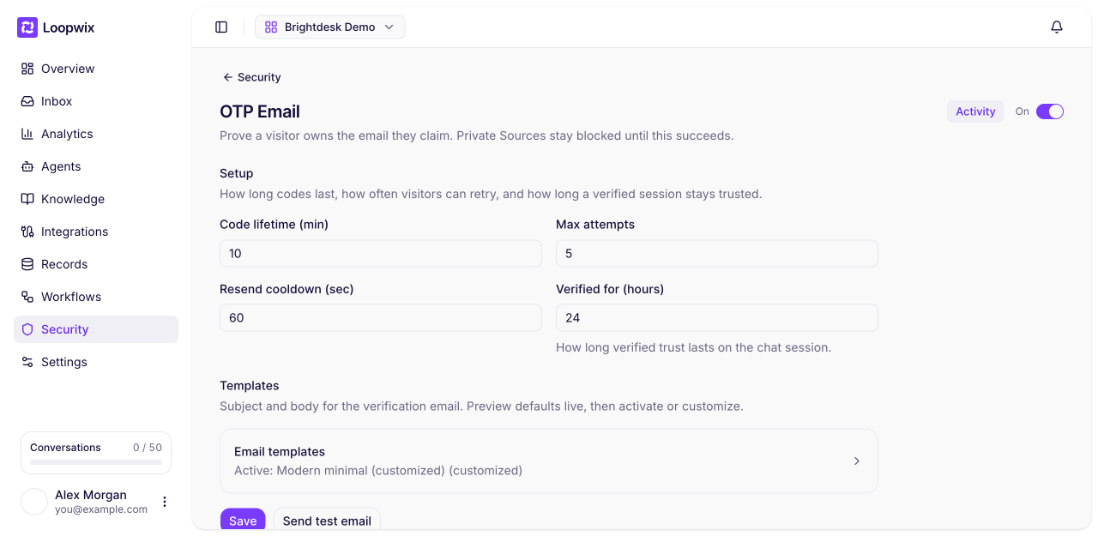
Open Security, then OTP Email, and switch it on; it is on by default for new workspaces. The customer enters their email and types the one-time code they receive. Private sources stay blocked until this succeeds. You can tune code lifetime, attempts and session length, and send a test email.
Turn it on
Open Security → OTP Email and switch it On (top right). It is on by default for new workspaces.
Setup
"How long codes last, how often visitors can retry, and how long a verified session stays trusted."
| Setting | Default | Meaning |
|---|---|---|
| Code lifetime (min) | 10 | How long a code works |
| Max attempts | 5 | Wrong guesses allowed before the code is locked |
| Resend cooldown (sec) | 60 | Minimum wait before a new code can be sent |
| Verified for (hours) | 24 | How long verified trust lasts on the chat session. This is shared with Magic Link |
Select Save.
Email delivery
The page tells you if email sending is not set up ("SMTP is not configured — test sends and visitor codes are logged in development only"). In production, make sure your deployment sends real email before relying on verification.
Templates
"Subject and body for the verification email." Open Email templates to preview, activate a design, or customise it. See Verification email templates.
Test
Select Send test email to send yourself a sample.
Activity
Select Activity (top right) for a log of verification attempts for this method, with a filter by method. You can clear it ("Clear all activity?"). The hub also shows Sent, Verified and Rate for the last 7 days, with test traffic excluded.
Used for: Security at Loopwix
Trust and verification
The trust levels, how a visitor reaches Verified, which things need it (integration capabilities, record tables, workflows), and what customers see.
Magic Link
Turn on one-time verification links, set link lifetime and resend cooldown, understand why the link needs a Continue click, and read activity.