
Routing and business hours
Set your team schedule and holidays, assign new tickets automatically and let Loopwix remind, escalate and close quiet tickets.
How do I assign chats to my team automatically?
Set your team schedule in Settings, then Workspace, then Business hours, with holidays if you need them. Then turn on automatic assignment so new tickets go to a teammate. Loopwix can also remind, escalate and close quiet tickets. You need the Admin role or higher.
Business hours
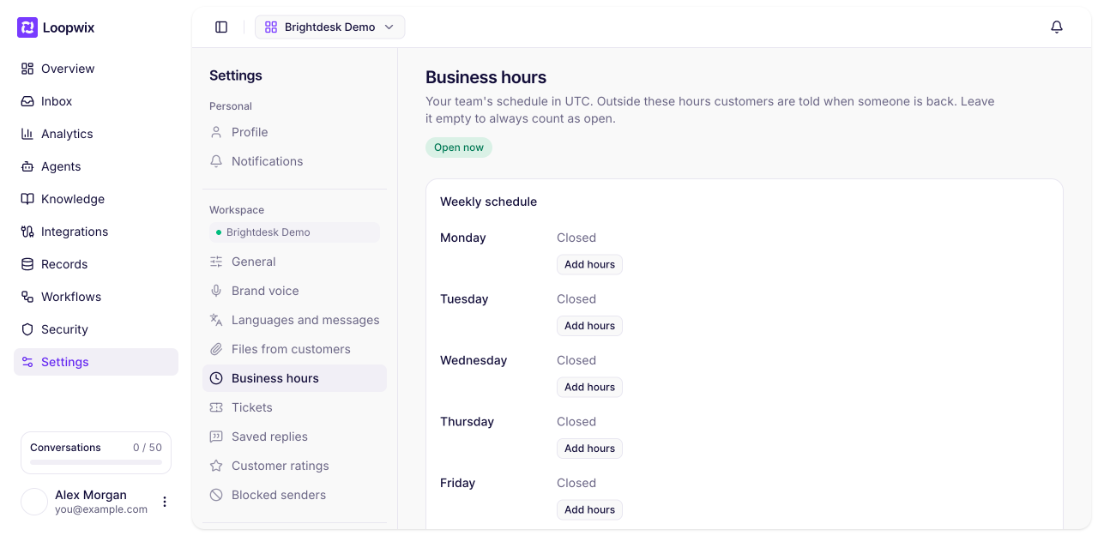
Open Settings → Workspace → Business hours (Admin and above).
- The schedule is set in UTC. "Outside these hours customers are told when someone is back. Leave it empty to always count as open."
- A Weekly schedule has Add hours per weekday; days start as Closed.
- Holidays: "A holiday with no hours is closed all day; give it hours for a shortened day." An Open now badge shows the current state.
- Customer reminders and automatic closing are sent only during business hours.
How business hours affect escalation
Business hours decide what customers are told and when automatic follow-ups run. Outside the schedule, customers are told when someone is back. Reminders and automatic closing only run during business hours. If you leave the schedule empty, the workspace always counts as open. To control whether the agent hands over at all, see Set up escalation.
Automatic assignment
Open Settings → Workspace → Tickets → Automation.
| Setting | What it does |
|---|---|
| Assign new tickets automatically | Off (people take tickets themselves), Round robin among available people, or Least busy first. Only people who are online and under their capacity are considered; a ticket with a team goes to someone on that team. If nobody is available it stays unassigned |
| Tell admins about tickets nobody has taken | After the minutes you set, owners and admins get a notification in Activities |
| Remind a customer who hasn't answered | One friendly message to a ticket Waiting on the customer for the hours you set; you can write the Reminder message (empty uses a short default) |
| Close tickets that stay Waiting | After the days you set the ticket closes itself (with your closing message, during business hours) |
| Remind customers who didn't rate | One reminder for an unanswered satisfaction survey |
Anything left empty is off. Assignments made by routing appear in the thread as "automatic: round robin" or "automatic: least busy".
Teams
Group teammates under Settings → Organization → Teams. Each team appears in the Inbox sidebar under Teams (for example General support), and a ticket with a team goes to someone on that team.
Set up escalation
Let your AI agent hand a conversation to a person: switch handover on, write when it applies, prepare requests and set the message customers see.
Tour of the Inbox
A guided look at the Inbox: the views panel, filters and search, the conversation, the details panel, and the table view.