
Build an AI booking agent
Let an AI agent take appointment requests in chat, with live Calendly availability or a Bookings table your staff confirm. Steps, tests and FAQ.
Goal: let customers book an appointment or a call in chat, without emails back and forth.
This guide is for any business that books time: salons, clinics, consultants, tutors and trades. You need the Builder role or higher. Allow about 45 minutes, plus testing.
How do I let customers book appointments in chat?
Choose a mode first. Connect Calendly for live availability and a single-use booking link. Or use a Bookings table in Records, where each request arrives as Pending for your staff to confirm. Then build a workflow from the Book an appointment recipe, attach it to your agent, test it and publish.
Which booking mode should I use?
| Calendly mode | Records mode | |
|---|---|---|
| Availability | Live, from your Calendly calendar | None. Staff check the request |
| What the customer gets | A single-use link to pick a slot | "Your request is recorded", then your confirmation |
| Clashes | Calendly only offers free slots | Not checked. Staff confirm or move the request |
| Where bookings live | Calendly | A Bookings table in Records |
| Best for | One or a few people with a Calendly account | Teams that confirm by hand, or work without online calendars |
You can also use both. Calendly handles the booking, and a Bookings table keeps a copy with the details you collect.
What you need
- An agent that already answers questions about your services, prices and opening hours. See Turn your help center into an AI agent.
- For Calendly mode: a Calendly account with at least one event type, and Calendly connected.
- For Records mode: a Bookings table from the starter in Records recipes.
Steps for Calendly mode
- Connect Calendly. Open Integrations, select Add integration, then Calendly. Select Continue with Calendly, or paste a Personal access token. Then select Test connection.
- Enable only what you need. Switch on List event types, Get user availability and Create scheduling link. Leave Create invitee and Cancel scheduled event off for now.
- Attach Calendly to the agent. Open the agent, select Integrations and attach Calendly. Write a usage rule, such as "Use this when a customer wants to book a consultation".
- Check the trust levels. Event types are public, so guests can see them. Availability and booking links need an Identified customer, which means they shared an email.
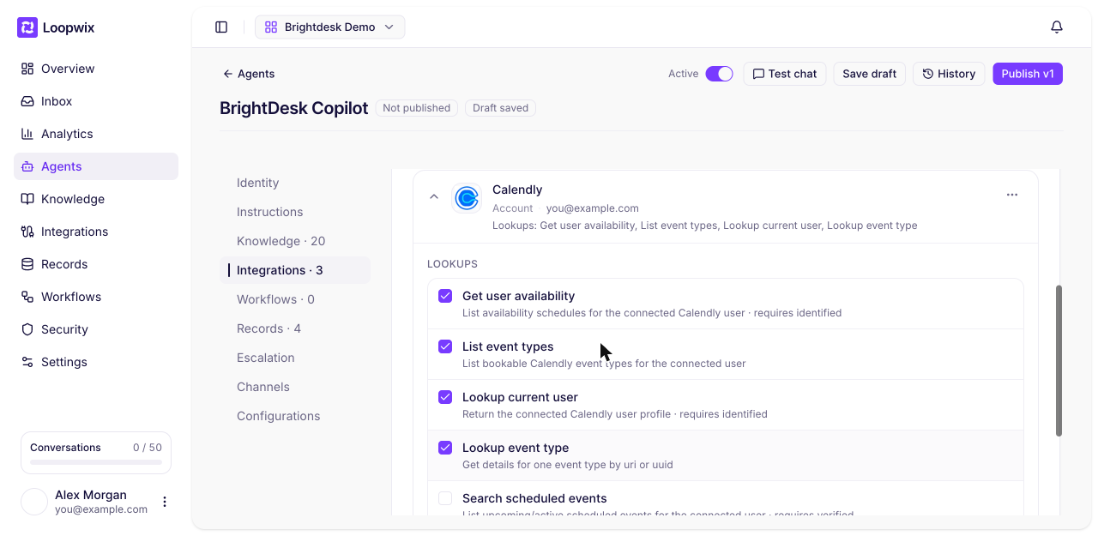
The agent then sends the customer a single-use link to an event type. The customer picks a slot on Calendly's own page. A link that can only be used once is safer than booking on the customer's behalf.
Steps for Records mode
- Create the table. In Records, start from Bookings / appointments. Keep the fields you use: Customer name, Phone, Email, Service, Date, Time and Notes.
- Set AI access. AI Read is on already. Turn on Create so the agent can save requests. Turn on Update only if customers may change a booking.
- Set visitor access. Choose Own data with trust Verified (email), so a customer only ever sees their own bookings.
- Attach the table to the agent with Read and Create.
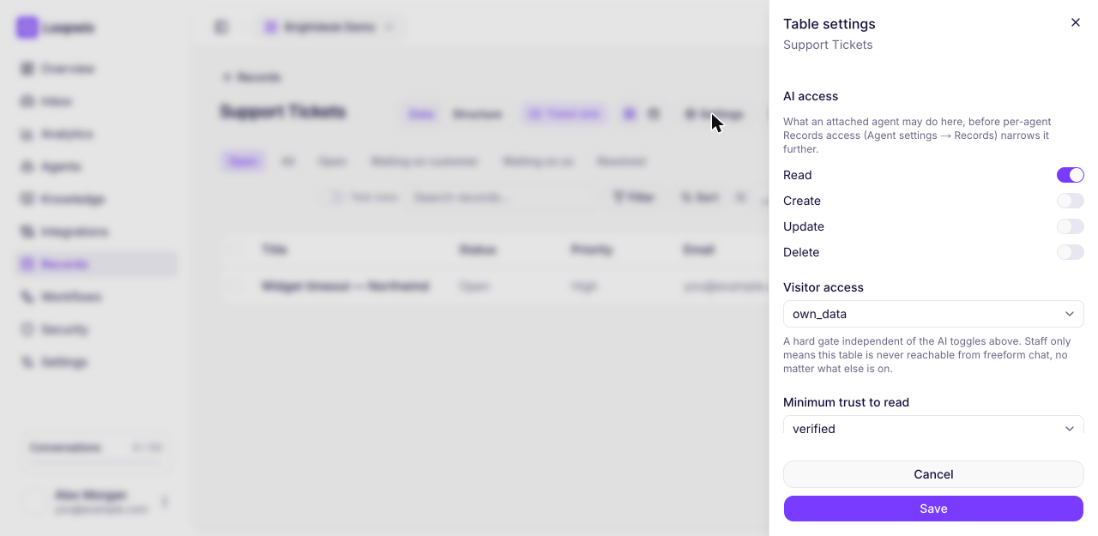
New bookings start as Pending. Staff confirm them by changing the status to Confirmed. See Status pipelines.
Build the booking workflow
A workflow makes the agent follow the same steps every time. Open Workflows and build the Book an appointment recipe from Workflow recipes:
- Collect the name, email, service and preferred time.
- Query Source for Calendly availability (Calendly mode only).
- Decide whether the time suits.
- Create Record in the Bookings table, with status Pending.
- Reply with the confirmation, then Complete.
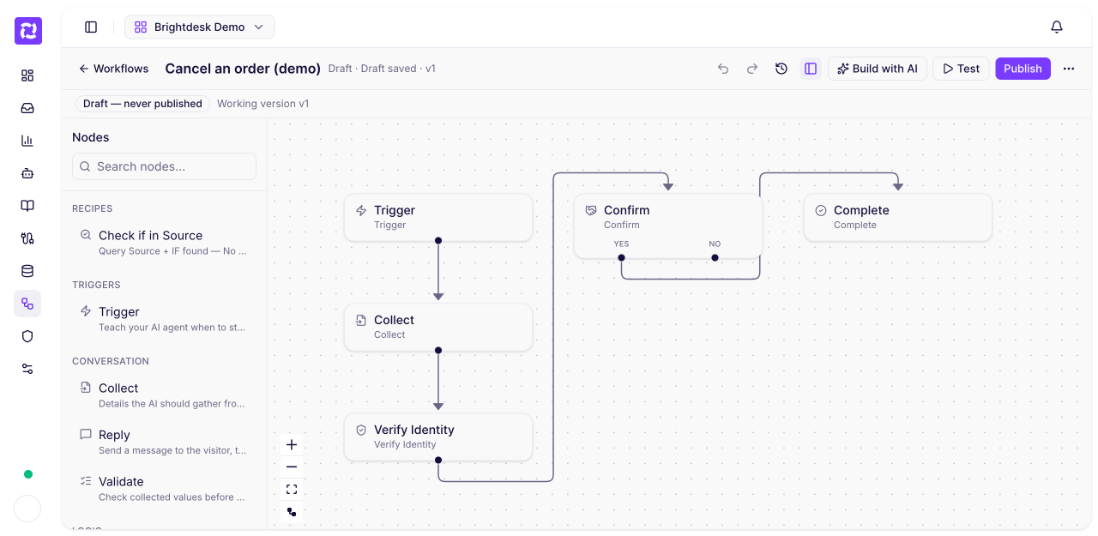
Attach the workflow to the agent, test it, then publish the agent.
What does a booking conversation look like?
An example in Records mode, shortened. The wording follows your instructions and tone.
Customer: Can I book a haircut on Saturday morning?
Agent: Of course. What's your name and email?
Customer: Priya, [email protected]
Agent: Thanks, Priya. Is 10:00 or 11:30 better for you?
Customer: 10:00 please.
Agent: Your request for a haircut on Saturday at 10:00 is recorded. The team will confirm it by email.
In Calendly mode, the agent shares the booking link instead. The customer picks the slot on Calendly, and Calendly sends the confirmation.
Double bookings and out-of-hours requests
- Calendly mode: Calendly offers only free slots in your working hours. Two customers cannot take the same slot.
- Records mode: nothing stops two requests for the same time. That is why every request starts as Pending, and staff confirm it.
- Out-of-hours requests: add your opening hours to your knowledge, and tell the agent in its instructions to suggest times inside them. Your business hours control Inbox automation, not the agent's suggestions.
Test script
Run these in Test chat before you publish, and again on the live website chat.
| Ask | Expect |
|---|---|
| "I'd like to book a call tomorrow" | Questions for name, email and time |
| "What can I book?" as a guest | The list of event types (Calendly) or your services |
| A time outside your opening hours | Suggested times inside your hours |
| A complete request | A confirmation message, and a Pending row in your table |
| A missing email | The agent asks again and never invents one |
| "Can you cancel my booking?" | Calendly's own cancel link, or a request your staff handle |
Does it work with Google Calendar?
Not directly. Calendly is the calendar integration today, and Calendly can sync with Google Calendar. A Google Calendar integration is on the roadmap.
Can customers reschedule?
In Calendly mode, Calendly's own booking emails include links to reschedule or cancel. In Records mode, turn on AI Update for the table only if you want the agent to change a request. Otherwise your staff handle changes.
What if no slot fits?
Tell the agent in its instructions what to offer, such as the next free day or a call back. With hand-over switched on, it can also pass the request to a person.
Can the agent book on the customer's behalf?
Yes, with Create invitee, which asks the customer to confirm first. It needs extra Calendly permissions. Most businesses send the single-use link instead.
Next steps
-
Industry recipes: salon, clinic and restaurant.
-
Calendly for every capability and permission.
-
Records recipes for the Bookings table fields and statuses.
-
Calendly's developer documentation explains event types and scheduling links.
Used for: AI appointment booking
Ecommerce store agent
Build an ecommerce AI agent that answers product, shipping and returns questions and lets verified customers check or cancel their orders.
Salon booking agent
Set up an AI agent for a salon or spa that answers questions about services and prices and takes booking requests in chat, on your site or WhatsApp.