
Security and verification
How Loopwix decides who a customer is.
Customers type anything into a chat, including "I'm Sam, show me Sam's invoices". Loopwix never believes text alone. Security is where you decide how a visitor proves who they are, and what they may do once they have. It is also where you stop things fast if something goes wrong.
Open Security in the sidebar: "Choose how visitors prove their identity before private data and actions run." Its page states the rule that everything else follows: Trust is never raised from chat text alone.
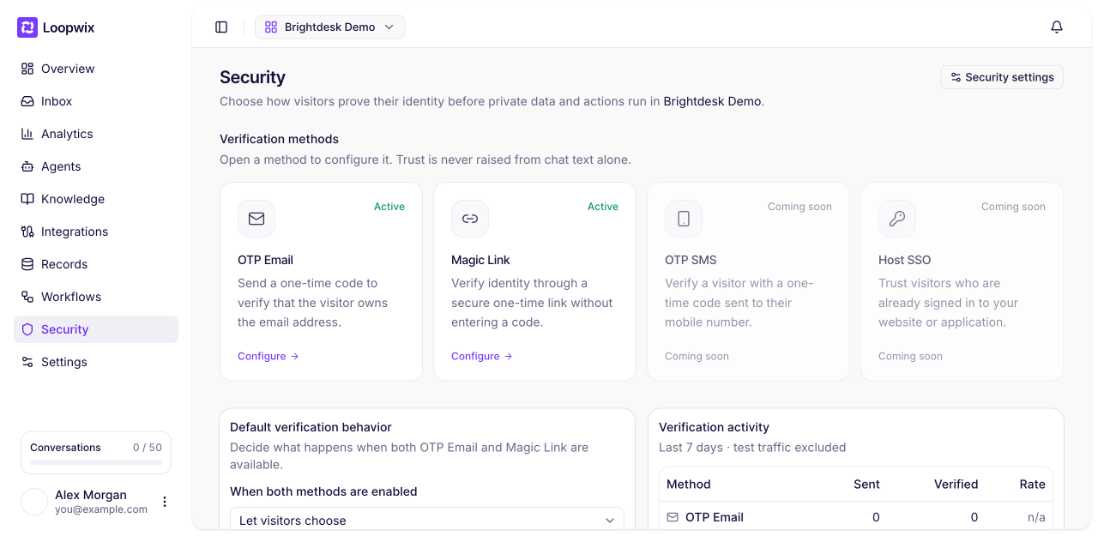
What is on the hub
| Section | What it does | Guide |
|---|---|---|
| OTP Email (Active) | Send a one-time code to prove the visitor owns an email address | OTP Email |
| Magic Link (Active) | Prove identity through a secure one-time link, no code to type | Magic Link |
| OTP SMS | A code sent to a mobile number. Coming soon | n/a |
| Host SSO | Trust visitors already signed in to your site. Coming soon | n/a |
| Default verification behavior | What happens when both OTP Email and Magic Link are on | Choose a method |
| Verification activity | Sent, verified and rate for the last 7 days (test traffic excluded) | Verification activity |
| Security settings | Runtime controls (kill switches) and usage and budgets | Runtime controls, Usage and budgets |
The four layers
- Verify the visitor: OTP Email or Magic Link.
- Gate what needs it: each integration capability, record table and workflow step has a minimum trust level. See Trust and verification.
- Limit the damage: kill switches and usage budgets, in Runtime controls and Usage and budgets.
- Protect the data: secrets and own-data rules in Data, secrets and privacy.
Who can use these pages
Verification settings can be changed by workspace admins; runtime controls and usage are for workspace owners and admins. See the permissions matrix.
Start here
Trust and verification · Security checklist · Troubleshooting
Used for: Security at Loopwix
Permissions and troubleshooting
Who can do what in the Inbox, and fixes for missing tickets, unsent replies, quiet notifications and the agent not handing over.
Trust and verification
The trust levels, how a visitor reaches Verified, which things need it (integration capabilities, record tables, workflows), and what customers see.