
Connect Shopify to your AI agent
Connect Shopify so your AI agent can find a verified customer's orders and, if you allow it, cancel orders and create refunds after confirming.
Connect Shopify so the agent can look up a customer's orders and, if you allow it, cancel or refund them.
How do I connect Shopify to my AI agent?
In Integrations, add Shopify and connect your store with an Admin API token, or OAuth where available. Enable Search orders so the agent can find orders for a verified customer. Turn on Cancel order and Create refund only if you want them; both ask the customer to confirm. Shopify is in beta.
What the agent can do
| Capability | Type | Default minimum trust | Confirmation |
|---|---|---|---|
| Search orders | Source | Verified | No |
| Cancel order | Action | Verified | Yes |
| Create refund | Action | Verified | Yes |
All three need a verified customer by default because they touch customer-specific data. Orders are found for the verified customer's own email, so a customer cannot look up someone else's order. Actions ask for confirmation first, and the confirmation covers the exact order and amount shown.
Connect
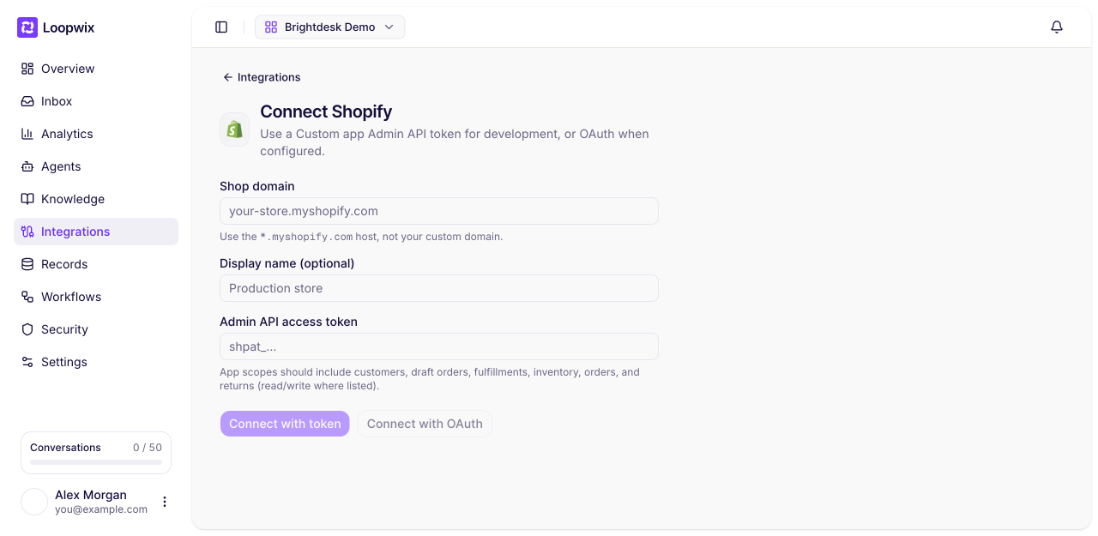
- Integrations → Add integration → Shopify. The page is headed Connect Shopify: "Use a Custom app Admin API token for development, or OAuth when" it is set up for your workspace.
- Enter your Shop domain, for example
your-store.myshopify.com. "Enter your shop domain first" appears if it is empty. - Optionally set a Display name, for example "Production store".
- Either paste the Admin API access token and select Connect with token, or select Connect with OAuth.
- You see Shopify connected. Select Test connection, then Verify capabilities.
Permissions Shopify needs
The default permissions are read customers, draft orders, fulfillments, inventory, orders and returns, plus write for orders, fulfillments and returns. If you use a custom app token, grant these (the page lists what is needed).
Then
Enable and attach the capabilities. Test with a real order number in Test chat as a verified customer.
Tips
- Develop against a development store before connecting production.
- Verification can create test data; run it on a development store.
- Keep Cancel order and Create refund off until you have tested them, and pair them with escalation and verification.
- Use the order Search orders result in an answer, and send refunds above your own limit to a person.
What customers can ask
With Shopify attached, customers can ask about their own orders after they verify their email:
- "Where is my order?" The agent shares the order number, date, items, total, payment status and fulfilment status.
- "Can I cancel my order?" With Cancel order on, the agent asks them to confirm the exact order, then cancels it.
- "Can I get a refund?" With Create refund on, the agent asks them to confirm the order and amount. Most stores route refunds to a person instead.
The agent does not see carrier tracking details, only Shopify's fulfilment status. A short example:
Customer: Has my order shipped yet?
Agent: I need you to verify your identity before I can help with that.
The customer verifies their email with a code.
Agent: Order #1042 from 3 March is paid and fulfilled, so it has left our warehouse.
What happens in Shopify
- Cancel order cancels the order in Shopify, restocks the items and lets Shopify email the customer.
- Create refund refunds the amount the customer confirmed, with the note "Refund via Loopwix". Shopify does not email the customer about it.
- A cancellation does not refund the payment by itself.
- If Shopify refuses an action, the agent says so and nothing changes.
Permissions in plain words
| Permission | What Loopwix does with it today |
|---|---|
| Read orders | Find orders placed with the verified customer's email |
| Write orders | Cancel an order and create a refund, after the customer confirms |
| Read customers, draft orders, fulfillments, inventory and returns; write fulfillments and returns | Requested by default, but not used by today's three capabilities |
If you create a custom app token, you can grant only read and write orders. The three capabilities still work.
Shopify explains each permission in its access scopes reference.
Can the agent show order details to anyone who asks?
No. Every Shopify capability needs a Verified customer by default, and results are filtered to the verified email. Someone else's order number returns nothing.
Does it work with WooCommerce or other stores?
There is no built-in connector for other stores today. A store with an HTTPS API can connect through a REST connection, or through an MCP server if it has one.
Can it track parcels with the carrier?
No. The agent sees Shopify's fulfilment status, not the carrier's tracking events.
For a full walkthrough, read Ecommerce AI agent for orders and returns.
Problems: Troubleshooting.
Used for: AI agent for online stores