
Build a WhatsApp AI support agent
Bring your Loopwix AI support agent to WhatsApp: connect through Meta, learn the 24-hour window and costs, verify customers and test before launch. Beta.
Goal: answer customers on WhatsApp with the same knowledge, instructions and workflows as your website chat.
This guide is for businesses whose customers already message them on WhatsApp. You need the Admin role in Loopwix and admin access to your Meta business. Allow an hour for a test number, longer for a real number.
How do I build an AI support agent for WhatsApp?
Finish and test your agent on the website chat first. Then create a Meta app with the WhatsApp product and connect it in the agent's Channels section. Try it in test mode with a few numbers, then go live with a verified number. The agent answers with the same knowledge and workflows. WhatsApp is in beta.
What you need
- An agent already tested on the website chat. See Turn your help center into an AI agent.
- A Meta business account and a Meta app with the WhatsApp product. A test number is free and instant.
- For a real number: Meta business verification and an approved display name.
- A payment method in Meta, because Meta charges for the messages you send.
Steps
- Finish the agent first. Knowledge, instructions and workflows should already work on the website chat.
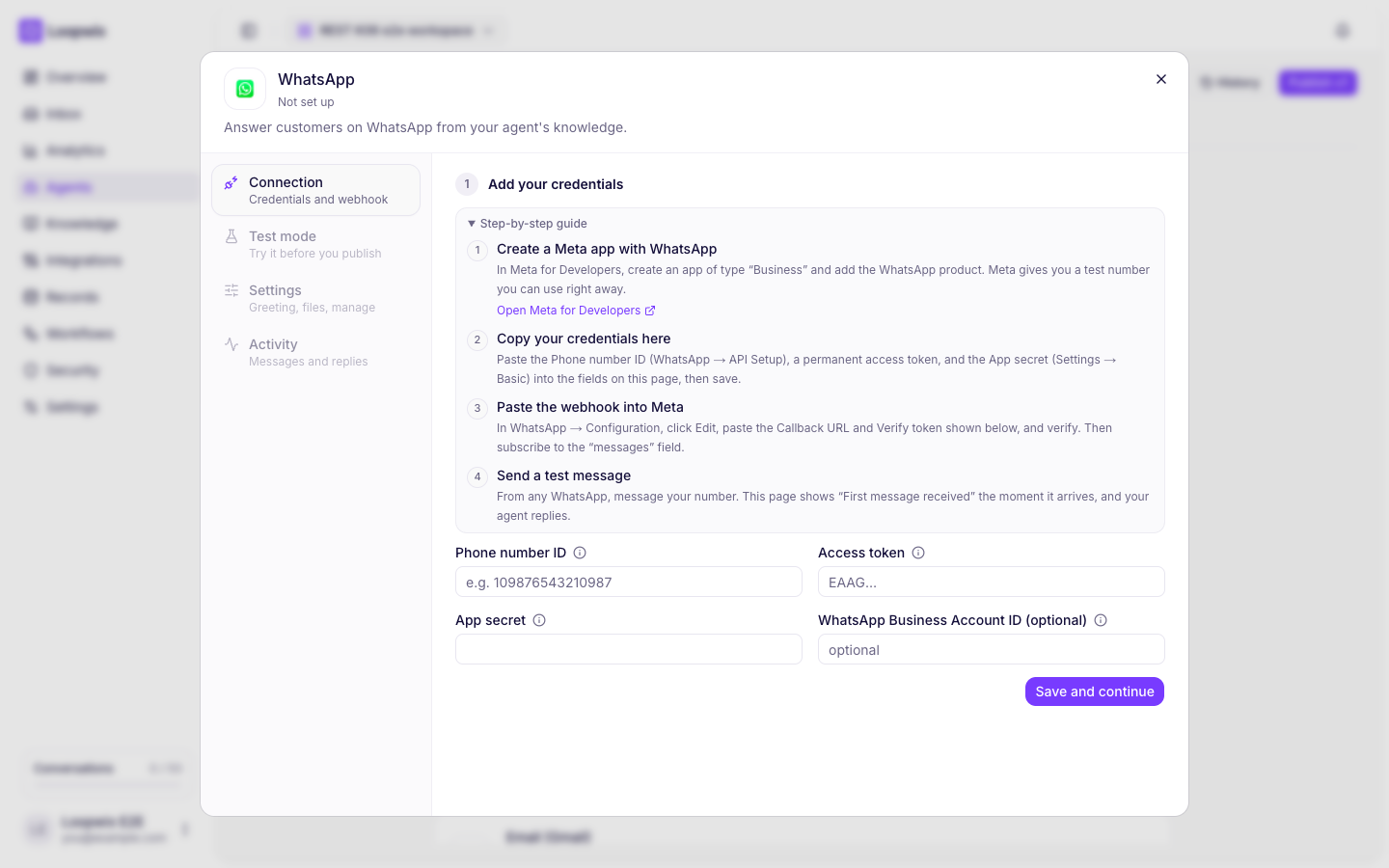
- Create the Meta app and a permanent token. Follow Connect WhatsApp. Use a system user token that never expires, not the 24-hour one.
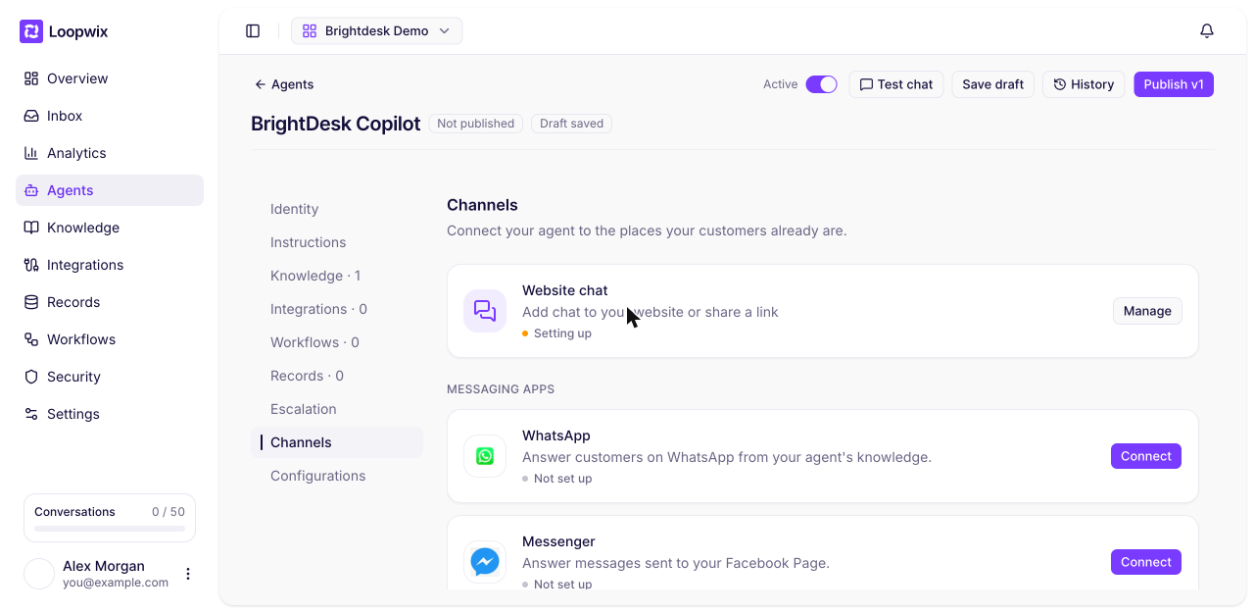
- Connect in Loopwix. Open the agent, select Channels, then WhatsApp. Paste the Phone number ID, Access token and App secret, and select Save and continue.
- Set the webhook in Meta. Paste the Callback URL and Verify token that Loopwix shows. Subscribe to the messages field.
- Turn on test mode. Add the phone numbers of your testers. They get answers from your latest draft, and nobody else does. See Messaging channel setup.
- Choose what customers may send. Photos, documents and voice notes are off by default. Turn them on under Settings → Photos and files on the connection.
- Go live. Complete Meta's business verification, switch to your real number, set the Meta app to Live, and publish the agent.
What is the 24-hour window?
WhatsApp lets a business reply freely for 24 hours after the customer's last message. After that, Meta only allows pre-approved template messages. Loopwix does not send template messages today. So once the window closes, nobody can reply until the customer writes again. The Inbox shows when the window has closed.
Each new message from the customer opens a fresh 24-hour window. Answer quickly, and ask your team to reply to hand-overs inside the window. WhatsApp costs and rules explains the window, templates and opt-in in more detail.
What does WhatsApp cost?
Meta charges your Meta account for messages you send, by message category, and prices differ by country. Meta changes its prices and free allowances from time to time. Check Meta's pricing page before you launch, and again each quarter.
How do customers verify on WhatsApp?
A WhatsApp number is never treated as proof of who someone is. When a customer asks for something private, such as an order, the agent asks for their email. Loopwix emails a 6-digit code, and the customer types it into the chat.
The code never reaches the AI model or your transcripts. The transcript shows "[verification code]" instead. The customer can reply RESEND for a new code, or CANCEL to skip. Without verification, the agent still answers general questions.
What does a WhatsApp conversation look like?
An example of an order question, shortened. The fixed lines come from Loopwix; the rest follows your instructions.
Customer: Hi, where is my order 1042?
Agent: To continue I need to verify your email address first. What's your email? (Reply CANCEL to skip.)
Customer: [email protected]
Agent: I've sent a 6-digit code to [email protected]. Reply with it here. (Reply RESEND for a new code.)
Customer: 482913
Agent: Thanks, you're verified. Let me pick up where we left off. Order 1042 is paid and has been fulfilled.
When an action needs a yes, such as cancelling an order, WhatsApp shows Yes and No buttons. Nothing changes until the customer taps Yes.
Bookings on WhatsApp
The booking agent works on WhatsApp as it does on the website. In Calendly mode, the customer gets a link and picks a slot in their browser. In Records mode, the request is saved as Pending for your staff. Your staff's confirmation must reach the customer within the 24-hour window, or by email.
Hand-over to a person
Hand-over is switched on by Loopwix on request; see Set up escalation. Once it is on, a hand-over creates a ticket in the Inbox marked as WhatsApp. Your team replies from the Inbox, and the reply arrives in the customer's WhatsApp chat. Replies are blocked once the 24-hour window has closed.
Opt-outs
A customer who sends "STOP" or "unsubscribe" gets one confirmation and no more messages. Sending "START" subscribes them again. See WhatsApp costs and rules.
Test script
Run these from a tester's phone while test mode is on, then again after you go live.
| Ask | Expect |
|---|---|
| A normal question | The same answer as on the website |
| A question about the customer's own order | A request for their email, then a code |
| A wrong code | A message with the tries left, and no order details |
| "Cancel my order" after verifying | Yes and No buttons, then the result |
| A photo or voice note | Read if files are on, or a polite request to type |
| "Talk to a person" | A ticket in the Inbox marked WhatsApp (once hand-over is on) |
| "STOP", then "START" | The unsubscribe reply, then "Welcome back! How can we help?" |
| A message from a number not on the test list | One short "not available yet" reply a day |
Can I use my existing WhatsApp number?
Yes, if you move it to the WhatsApp Business Platform in Meta. A number used in the WhatsApp app must be registered with the platform first. Meta's WhatsApp Business Platform docs explain the options for your number.
What happens after 24 hours?
The window closes. The agent and your team cannot message the customer until they write again, because Loopwix does not send templates today. Their next message opens a new window.
Do I need Meta business verification?
Not to test. A Meta test number works at once with up to five recipient numbers. To use your own number with customers, Meta asks for business verification and reviews your display name.
Which WhatsApp providers does Loopwix support?
Loopwix connects directly to Meta's WhatsApp Cloud API, with your own Meta app and token. Other messaging APIs, such as Twilio's, are not supported.
Next steps
- Connect WhatsApp for every setup step and fix.
- WhatsApp costs and rules for templates, the 24-hour window and opt-in.
- Messaging channel setup for test mode, Activity and credentials.
Internal IT helpdesk agent
Build an internal IT helpdesk agent that answers staff questions from your wiki in Notion, Confluence or Drive, and escalates to IT in Slack.
Multilingual support agent
Serve customers in several languages from one Loopwix AI agent: set your languages and tone, add knowledge per language, and test each one.