
Ecommerce AI agent for orders and returns
Build an ecommerce AI agent that answers product, shipping and returns questions and lets verified customers check or cancel their orders.
Goal: answer "where is my order?" without a person and cut repeat questions about shipping and returns. Every change to an order stays under your control.
This guide is for online stores on Shopify. It takes about an hour once your policy pages are written. The Shopify integration is in beta.
How do I set up an AI agent for my online store?
Add your shipping, returns and product pages as knowledge, and turn on email verification. Connect Shopify and approve only the capabilities you want: look-up first, and cancel only once you trust the flow. Build the order workflows, then test them with real order numbers before you go live.
What you need
- A Shopify store, and permission to install a custom app or approve Loopwix in Shopify. See Shopify.
- Your shipping, returns and product pages, public on your website or as files.
- OTP Email switched on, so customers can prove who they are. It is on by default in new workspaces.
- The Builder role or higher in Loopwix.
Steps
1. Teach the agent your policies
Add your shipping, returns and FAQ pages with Add website pages, or upload them as files. Publish each item and attach it to the agent. These answers need no verification, because they are the same for every customer.
2. Connect Shopify
Open Integrations, then Add integration, then Shopify. Enter your Shop domain, such as your-store.myshopify.com. Paste an Admin API access token and select Connect with token, or select Connect with OAuth. Then select Test connection and Verify capabilities.
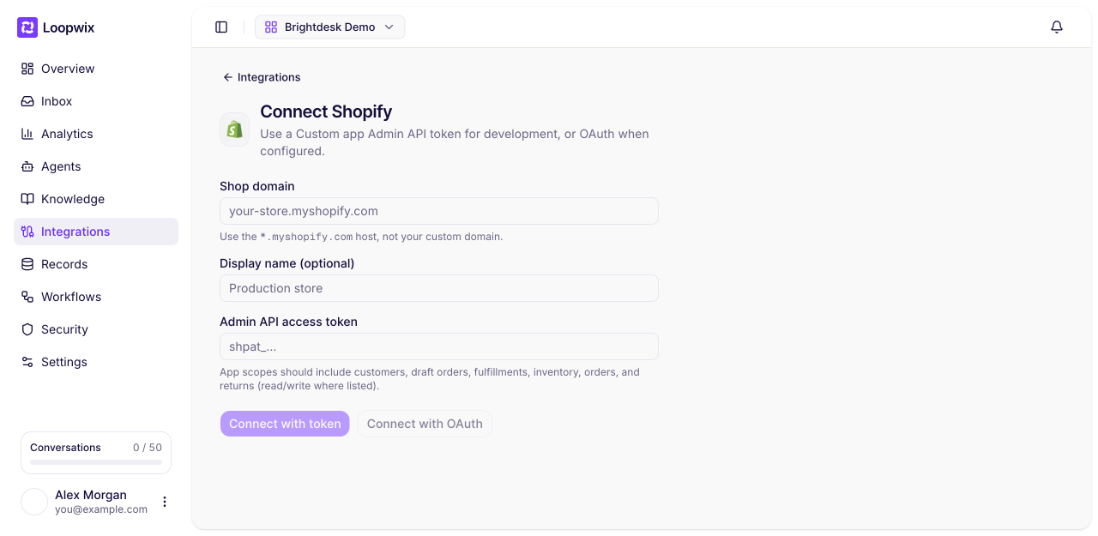
The custom app needs the access scopes listed on the connect page. Shopify explains each scope in its access scopes reference.
3. Turn on email verification
Open Security, then OTP Email, and check that it is On. A customer who asks about their own order is asked to verify their email first. The chat shows "Verify your email", then sends a one-time code.
4. Attach order look-up to the agent
Open the agent and select Integrations. Attach Shopify and keep only Search orders for now. Write a short usage rule, for example "Use this when a customer asks about an order they placed".
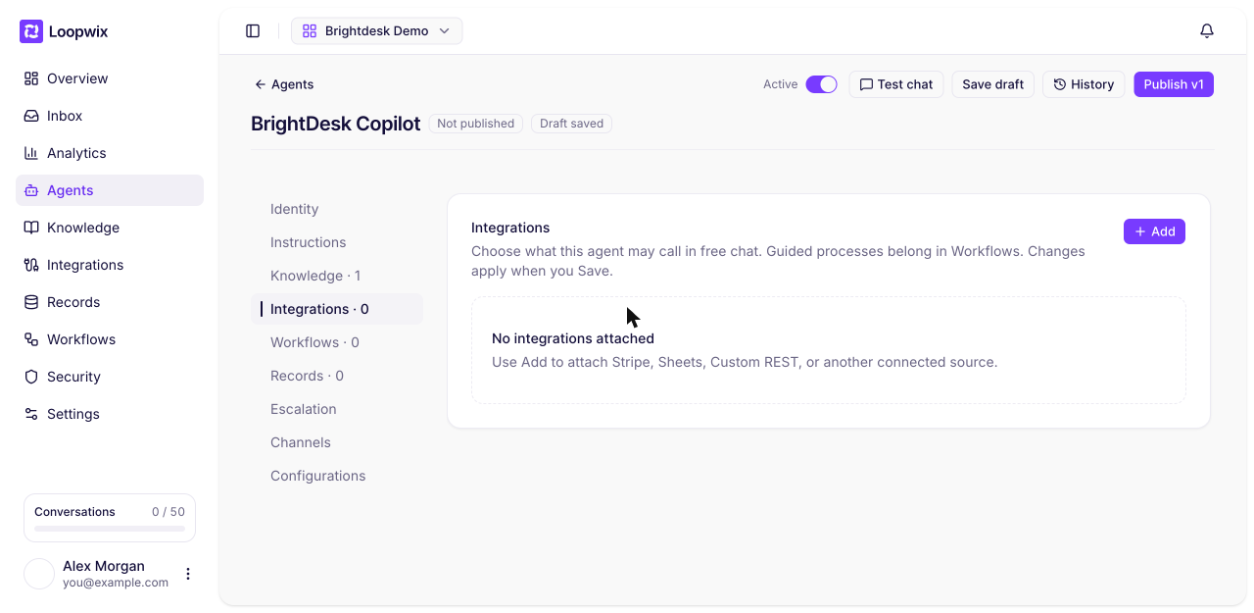
Search orders only returns orders placed with the customer's verified email. It shows each order's number, date, items, total, payment status and fulfilment status. It does not show carrier tracking.
Add cancellation and decide what needs a person
5. Add cancellation with a confirm step
Turn on Cancel order only when look-up works well. The safest way is a workflow from the Cancel an order recipe in Workflow recipes. It verifies the customer, finds the order, asks them to confirm, then cancels. That way a cancellation always follows a verified look-up.
When Loopwix cancels an order, Shopify restocks the items and emails the customer. The cancellation does not ask Shopify for a refund.
6. Decide what needs a person
Keep Create refund off and send refund requests to your team instead. Refunds with human approval shows how. Hand-over to a person is switched on by Loopwix on request; see Set up escalation.
7. Publish on your website
Publish the agent, then install the website chat on your store.
What does a conversation look like?
An example, shortened. Your agent's wording follows your instructions and tone.
Customer: Where is my order #1042?
Agent: I can check that. First, please verify your email.
The chat shows Verify your email. The customer enters their email, receives a code and types it in.
Agent: Thanks. Order #1042 was placed on 3 March. It is paid and not yet fulfilled, so it has not shipped.
Customer: Can I cancel it?
The chat shows Confirm action: "Please confirm before I continue. Nothing has been changed yet."
Customer: Selects Yes.
Agent: Done. Order #1042 is cancelled, and Shopify will email you a confirmation.
What will the agent not do?
- Show an order before verification. Every Shopify capability needs a Verified customer by default.
- Show someone else's order. Search results are filtered to the verified email.
- Change an order without a yes. Cancel and refund ask the customer to confirm the exact order first. A confirmation expires after 5 minutes.
- Use a capability you did not enable and attach.
Test script
Run these in Test chat as a verified visitor, and again on your live site with a test order.
| Ask | Expect |
|---|---|
| "What is your return policy?" | The policy from your knowledge, with a source |
| "Where is my order?" | A request to verify, then the order status |
| "Where is order #1042?" with someone else's order number | No details shown |
| "Cancel my order" | The Confirm action step, then the cancellation |
| "No" at the confirm step | "Cancelled — nothing was changed." |
| "I want my money back now" | A refund request recorded for your team |
Does it work with WooCommerce?
There is no built-in WooCommerce connector today. You can connect any store with an HTTPS API through a REST connection, or through an MCP server if it has one.
What if the order has already shipped?
The agent sees the fulfilment status and can tell the customer. If Shopify refuses to cancel the order, the agent says so and nothing changes.
Can the agent issue refunds?
Yes, with Create refund, after the customer confirms the order and amount. Shopify does not email the customer about these refunds. Most stores keep it off and route refunds to a person.
How is the customer verified?
By a one-time code sent to their email, or a one-time link if you turn on Magic Link. Orders are matched to that verified email.
Next steps
- Build an order status agent for "where is my order?" alone.
- Refunds with human approval for refund requests.
- Shopify for every capability and setting.
Used for: AI agent for online stores
Order status agent
Let customers ask where their order is: verify them by email, look the order up in your store or API and answer, or hand over.
Booking agent
Let an AI agent take appointment requests in chat, with live Calendly availability or a Bookings table your staff confirm. Steps, tests and FAQ.