
Multilingual support agent
Serve customers in several languages from one Loopwix AI agent: set your languages and tone, add knowledge per language, and test each one.
Goal: answer each customer in their own language, from one agent and one set of knowledge.
This guide is for businesses with customers who write in more than one language. You need the Admin role to change language settings, and Builder for knowledge. Allow about an hour, plus testing in each language.
Can one AI agent answer in several languages?
Yes. The agent replies in the language the customer writes in. It can answer from knowledge written in another language, though quality is best when they match. Set your main language and tone in settings, add your most important pages in each language you can, and write the fixed messages per language. Then test each one.
Which languages are supported?
Loopwix supports 12 Tier 1 languages: English, Spanish, Portuguese, French, German, Italian, Turkish, Indonesian, Chinese, Hindi, Arabic and Tamil. It also supports 16 Tier 2 languages, such as Polish, Japanese and Korean. Other languages get a best-effort reply. The full list is in Supported languages.
How does the agent choose the language?
It follows the customer. Whatever language the customer writes in, the agent replies in that language. If the customer switches language, the agent switches too.
The website chat's own buttons and hints follow the visitor's browser language. They switch when the visitor writes in another language that Loopwix has interface text for. You do not translate them yourself.
What you need
- Your main language and the languages you expect, from your analytics or your team's experience.
- Knowledge in your main language, plus your most important pages in the other languages.
- Someone who reads each language, to check the test answers.
Steps
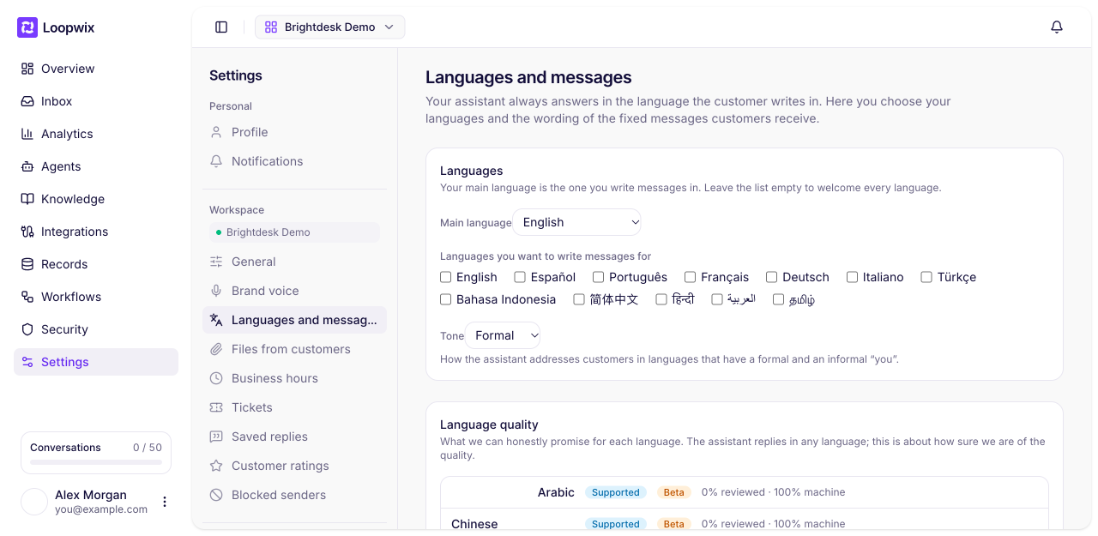
- Set your languages. Open Settings → Workspace → Languages and messages. Choose the Main language, and list the Languages you want to write messages for. See How languages work.
- Choose the tone. Pick Formal or Informal. It decides how the agent addresses customers in languages with a formal and an informal "you", such as German or French.
- Tell Loopwix the language of your knowledge. Set the language of each document, so answers can use it well. See How answers use knowledge.
- Add translated knowledge where it matters. Policies, prices and opening hours are worth having in each main language. For the rest, the agent answers across languages from your main knowledge.
- Write the fixed messages. Write your greeting and hand-over message in each language you listed. The email templates for verification can be written per language too.
- Test each language, then publish the agent.
Knowledge by language
You do not need a full copy of your knowledge in every language. The agent can find an answer in an English page and reply in Spanish. Quality is best when the question and the knowledge share a language.
A good rule: translate the ten pages customers ask about most, in your two or three biggest languages. Leave the rest in your main language. Check AI insights later to see which questions need a translated page.
What does a conversation look like?
An example, shortened. The knowledge is in English; the customer writes in Spanish.
Customer: Hola, ¿hacen envíos a Portugal?
Agent: Sí, enviamos a Portugal. La entrega tarda de 3 a 5 días laborables.
Customer: ¿Y cuánto cuesta?
Agent: El envío a Portugal cuesta 6,90 EUR, y es gratis en pedidos de más de 50 EUR.
Your team and other languages
Teammates set the language they read and the languages they can answer in, in Your profile. Teams can do the same in Teams.
Translation in the Inbox lets a teammate read the customer's messages in their own language. It is not switched on by default; ask Loopwix if you need it. Hand-over to the Inbox is also switched on by Loopwix on request; see Set up escalation.
Test script
Ask someone who reads each language to check the answers.
| Ask | Expect |
|---|---|
| A question in your main language | A normal answer |
| The same question in another supported language | An answer in that language, with the same facts |
| A question answered only by English knowledge, asked in another language | A correct answer in the customer's language |
| A switch of language halfway through | The agent switches with the customer |
| A question in a language with a formal "you", such as German | The tone you chose, formal or informal |
| A language not on the supported list | A best-effort reply |
Do I need to translate all my knowledge?
No. The agent answers across languages from your main knowledge. Translate the pages customers ask about most, for the best quality.
Can I limit the agent to certain languages?
The agent always replies in the customer's language. Leaving the list of message languages empty welcomes every language. You can tell the agent in its instructions what to say for languages you do not serve.
Does it work on WhatsApp and email?
Yes. The agent follows the customer's language on every channel. Fixed messages, such as the hand-over message, use the version you wrote for that language.
How good is each language?
Settings show a quality label per language, and how much of its wording is reviewed by people. Tier 1 languages are supported best.
Next steps
- How languages work for every setting.
- Supported languages for the full list.
- Read the dashboards to see which languages your customers use.
WhatsApp support agent
Bring your Loopwix AI support agent to WhatsApp: connect through Meta, learn the 24-hour window and costs, verify customers and test before launch. Beta.
Go live with confidence
Run a testing matrix and checklist before you publish your Loopwix AI agent, and know what to watch in the first week after customers start chatting.