
Integrations
Connect the systems your AI agent uses in chat, such as Shopify, Stripe, Slack, Gmail, Calendly and Google Sheets, and control what it may do.
Integrations is where your agent gets hands. Knowledge teaches it what to say. Integrations let it look things up and do things in other systems. It can find an order, check an invoice, offer a booking link, post to Slack, or add a row to a spreadsheet.
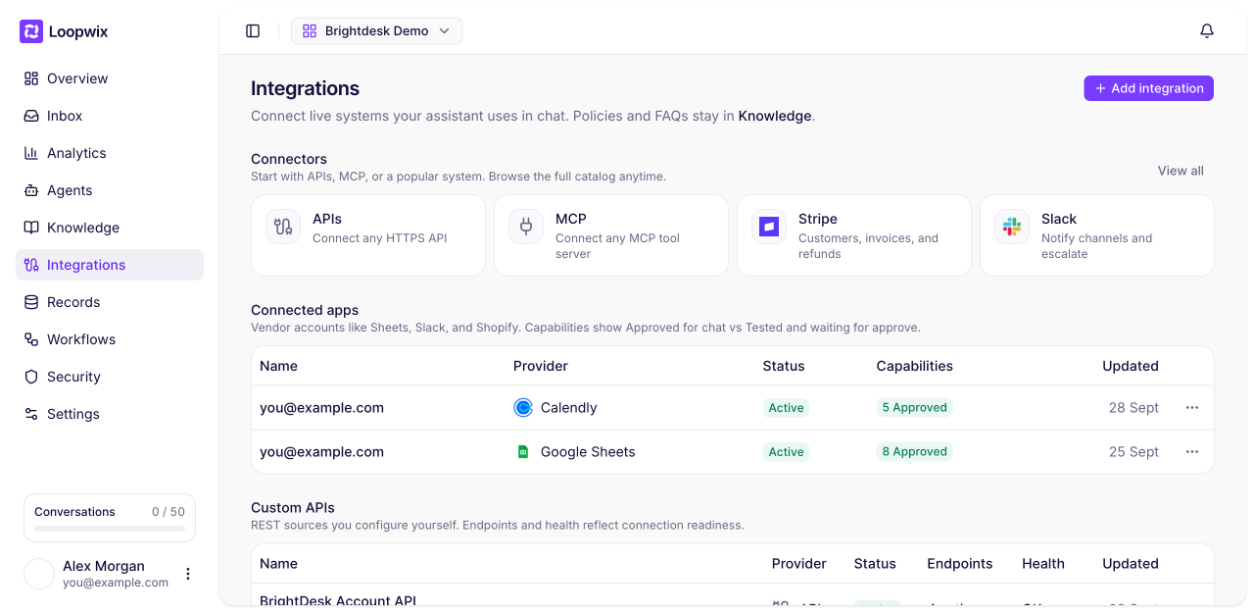
Open Integrations in the sidebar. The page says "Connect live systems your assistant uses in chat. Policies and FAQs stay in Knowledge."
When to use an integration instead of knowledge
| If the answer is… | Use |
|---|---|
| The same for everyone and rarely changes (policies, FAQs, product info) | Knowledge |
| Different per customer or changes constantly (order status, invoice, availability) | An integration |
| Something the agent should do (cancel, refund, send, book, notify) | An integration, with confirmation |
| Your own structured data that Loopwix stores (bookings, tickets) | Records |
What you can connect
| Connector | What it is for | Guide |
|---|---|---|
| APIs (REST) | "Connect any HTTPS API": your own backend or any web service | REST APIs |
| MCP | "Connect any MCP tool server" | MCP servers |
| Shopify | "Orders, cancel, and refunds" | Shopify |
| Stripe | "Customers, invoices, and refunds" | Stripe |
| Slack | "Notify channels and escalate" | Slack |
| Gmail | "Send email from the assistant" | Gmail |
| Calendly | "Event types and bookings" | Calendly |
| Google Sheets | "Lookup and update rows" | Google Sheets |
Coming soon
HubSpot, Google Calendar, Outlook, Jira, Salesforce and ServiceNow appear in the catalog as Coming soon. They cannot be connected yet.
The Integrations page
- Connectors: shortcuts to APIs, MCP, Stripe and Slack, with View all to open the full catalog.
- Connected apps: "Vendor accounts like Sheets, Slack, and Shopify." Each row shows the account, its provider, Status, how many Capabilities are approved, and when it was Updated. The Actions menu on a row lets you disconnect it.
- Custom APIs: "REST sources you configure yourself." Each row shows Provider, Status, number of Endpoints, Health and Updated. The Actions menu has Advanced setup and Delete.
The path every integration follows
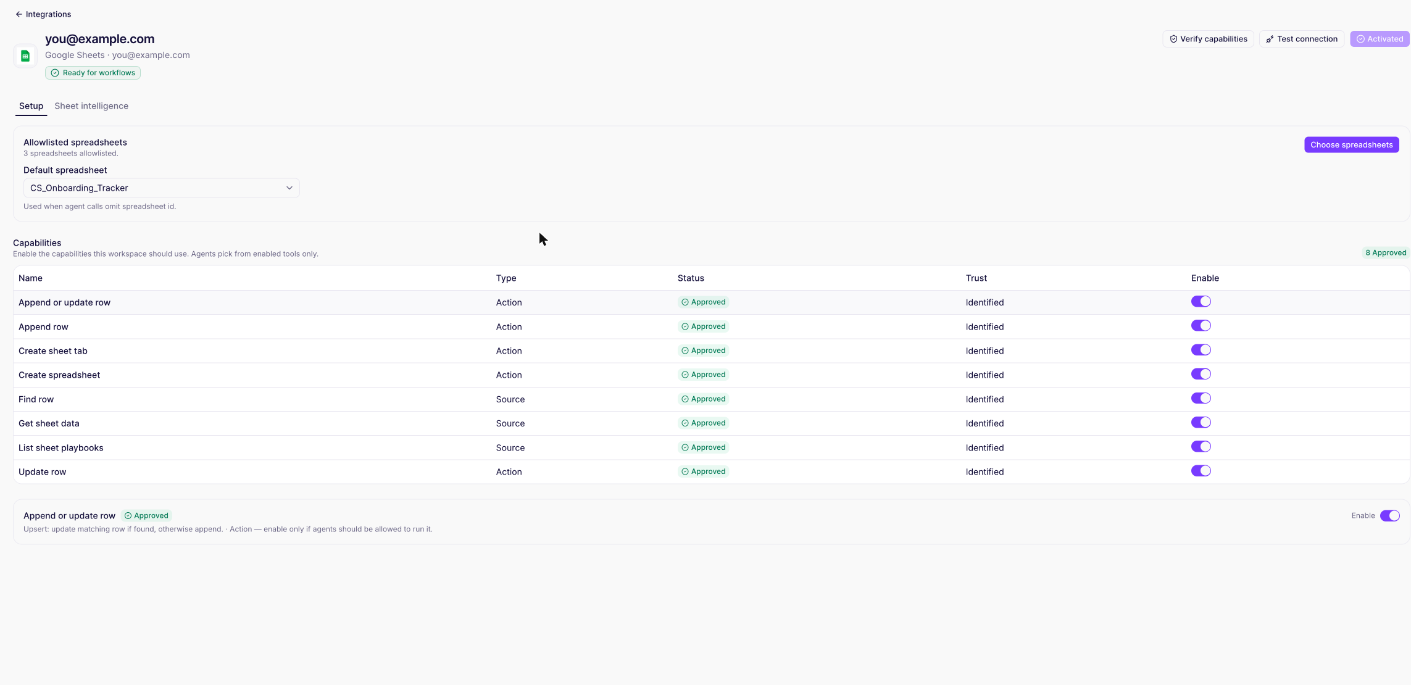
- Connect the system with a sign-in, token or key.
- Test the connection.
- Verify its capabilities so they become Approved.
- Enable the capabilities the workspace should use.
- Attach them to an agent and publish.
- Test in Test chat.
Details: Connect and attach an integration.
Safe by design
Loopwix does not simply hand the AI a key. Every call passes the same checks:
- Only approved, enabled and attached capabilities exist for the agent.
- The customer must reach the capability's minimum trust level.
- Customer-specific data is limited to the verified customer.
- Actions need an explicit confirmation.
- Secrets are never shown to the model.
See How integrations work and Security, permissions and health.
Where to go next
- How integrations work
- Connect and attach an integration
- Security, permissions and health
- Troubleshooting
Knowledge connectors such as Google Drive and Notion live under Knowledge; see How connector sync works.
Who can do this
Owners, Admins and Builders can manage integrations. See Roles and permissions.
Connector problems
Fix Loopwix knowledge connector problems: authorisation expired, items that stop syncing, or a file missing from Google Drive, Notion or Microsoft 365.
How integrations work
How every Loopwix integration works: a connection, its capabilities, a status for each (Draft, Tested, Approved), a minimum trust level and agents.