
Turn your help center into an AI agent
Turn your help center into an AI support agent that answers from your existing articles, passes your tests and hands tricky questions to your team.
Goal: answer common questions from your help center, and hand the rest to your team.
This guide is for any business with help articles, FAQs or policy pages on its website. It is the best first agent to build. You need the Builder role or higher. Allow about an hour, plus testing.
How do I turn my help center into an AI agent?
Add your help center as website pages, and fill gaps with files or FAQs. Wait until the sources are ready, then publish them and attach them to your agent. Choose how answers cite their source. Test with real customer questions, then publish the agent and install the website chat.
Which help centers can I import?
Any help center that is public on the web, whatever tool hosts it. Loopwix reads the pages like a visitor would. You enter the address, and Loopwix discovers the linked pages for you to choose from.
Pages behind a login cannot be read. Neither can pages that build their text with scripts, or that are mostly images. For those, export the articles and upload them as files, or paste them into a text note.
What you need
- A public help center, docs site or FAQ page, or exported articles.
- A workspace with an agent. See the quickstart.
- 20 to 30 real customer questions, from your inbox or old chats, to test with.
Steps
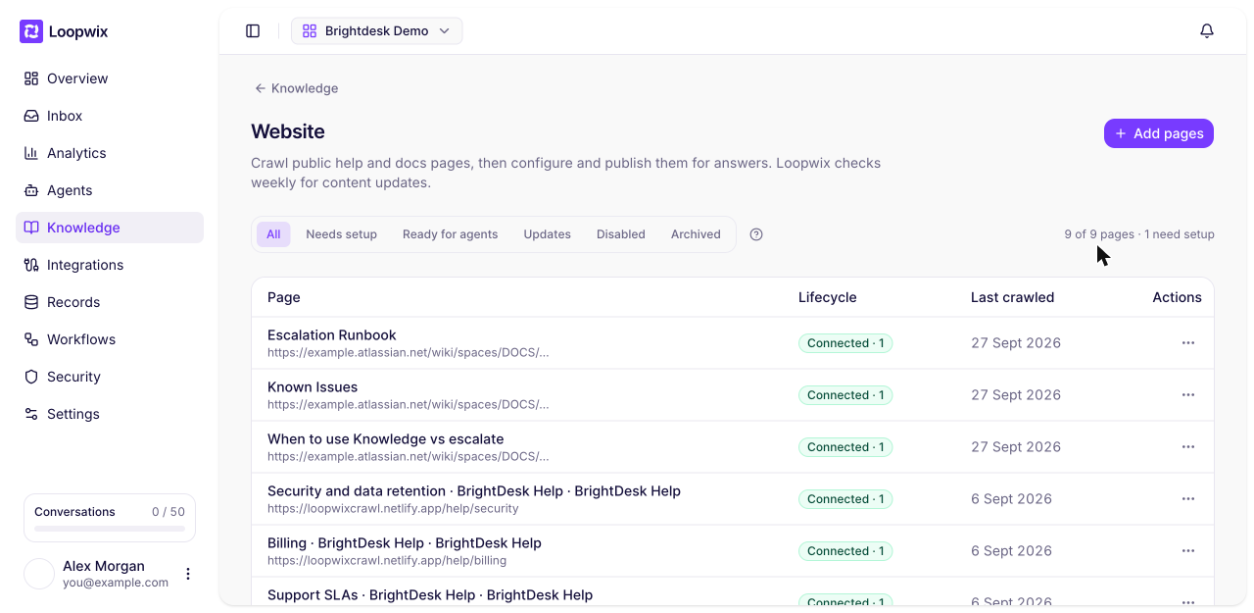
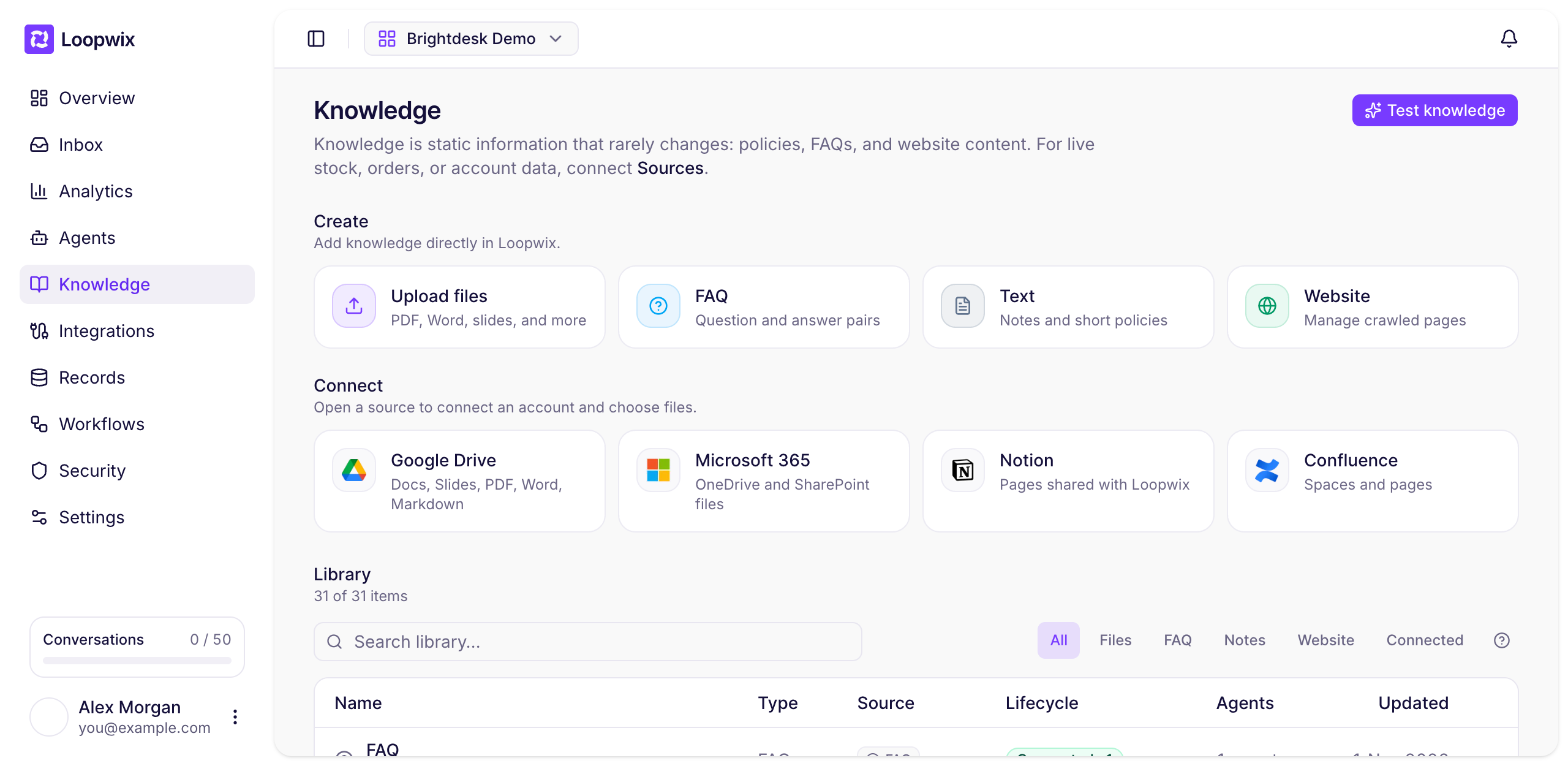
- Import the help center. Select Knowledge, then Website, and enter the help center address. Loopwix finds up to 25 linked pages. Select up to 15 to add in one step, then repeat for the rest. See Add website pages.
- Review the extracted text. Remove menus, cookie banners and footers from each page before you add it.
- Fill the gaps. Add short answers as FAQs. Upload PDFs and documents as files.
- Publish and attach. Wait until each item is ready, then publish it and attach it to the agent.
- Write instructions. Say what the agent answers, its tone, and to say so when it does not know. See Write good instructions.
- Plan hand-over. Hand-over to a person is switched on by Loopwix on request. Once it is on, set it up in Set up escalation. Until then, tell the agent how customers can reach you.
- Install and publish. Install the website chat, test, then publish the agent.
How should answers cite their source?
Each knowledge item has a citation mode. Website pages link to their source by default, so customers can open the full article.
| Mode | Best for |
|---|---|
| Link | Public help articles |
| Title | Files and internal documents |
| Excerpt | Terms where the exact wording matters |
| Answer only | Sources that should stay private |
See Citation modes for each option.
What does a conversation look like?
An example, shortened.
Customer: How do I reset my password?
Agent: Select Forgot password on the sign-in page and enter your email. You'll get a reset link within a few minutes.
Under the answer: Source: How to reset your password (link)
Customer: Can I change the email on my account?
Agent: I don't have information about changing your account email. You can reach the team at [email protected].
The second answer is the agent being honest. Add an FAQ for that question, and the next customer gets an answer.
Keep the answers fresh
Help centers change. Loopwix can tell you when an imported page has changed at its source. See How website freshness works. When an article changes, update the item and publish it again.
Test script
Run these in Test chat before you publish, and again on the live website chat.
| Ask | Expect |
|---|---|
| A question your help center answers | A correct answer with a source, in your tone |
| A rephrased version of the same question | The same answer |
| Something not in your content | An honest "I don't know", not a guess |
| "Can I speak to a person?" | Your hand-over message, or how to contact you |
| A question in another language | A reply in that language, from your knowledge |
| A question about a competitor | A polite answer that sticks to your products |
Can I import from Zendesk, Intercom or Help Scout?
Yes, if the help center is public. Loopwix imports it as website pages, whatever tool hosts it. There is no direct connector to those tools.
How many articles can I add?
Up to 15 pages in one step, from up to 25 found at a time. Repeat the import for more. Your plan also sets limits; see Limits and formats.
Will the agent make things up?
It answers from the knowledge you attach. When nothing fits, it says it does not know. Test with questions you know are not covered, to check this.
What if my articles are behind a login?
Export them and upload them as files, or connect the tool where they live, such as Notion or Confluence.
After launch
Check AI insights weekly for the questions the agent could not answer. Add knowledge or FAQs for them. Improve your agent weekly shows a 30-minute routine.
Guides and recipes
Step-by-step recipes that combine agents, knowledge, integrations, records, workflows and the Inbox to reach a goal, from bookings to order status.
Order status agent
Let customers ask where their order is: verify them by email, look the order up in your store or API and answer, or hand over.