
Activity log
Review who changed what and when across your Loopwix workspaces in the activity log, including automated changes, and export it as CSV for audits.
How do I see who published or changed an agent?
Open Settings, then Organization, then Activity log. Each row shows when, who, what changed and in which workspace. Automated changes appear as system, with a reason. Select Export CSV to download the log for an audit. You only see what your role gives you access to.
What the log shows
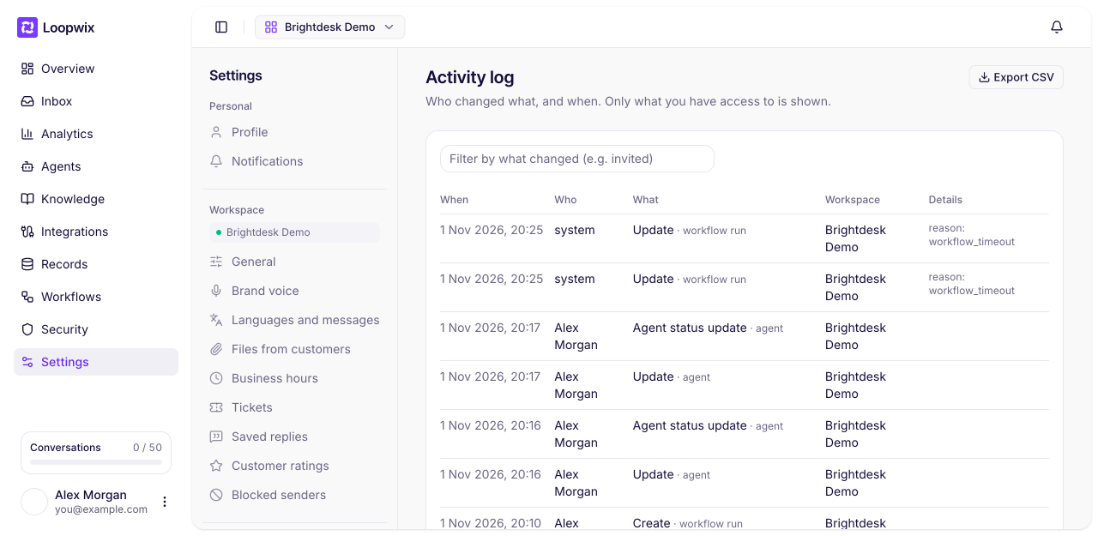
Open Settings → Organization → Activity log: "Who changed what, and when. Only what you have access to is shown."
Each row has When, Who, What (for example "Update · agent", "Agent status update · agent", "Create · workflow run", "Agent builder action execute"), Workspace and Details. Automated changes appear as system with a reason (for example a workflow run timing out).
Select Export CSV to download the log, for example for audits. Use it to answer "who published this agent?" or "when did that setting change?".
See also Security for verification and runtime audit data.
Used for: Security at Loopwix
Roles and teams
The five Loopwix roles, Owner, Admin, Builder, Support and Viewer, what each one may do, and how teams route new tickets to the right people.
Your profile
Set your name, the languages you read and answer in, your ticket capacity and privacy display in Loopwix, confirm your email and manage notifications.