
Magic Link
Turn on one-time verification links, set link lifetime and resend cooldown, understand why the link needs a Continue click, and read activity.
Magic Link proves email ownership with a one-time link: "Private Sources stay blocked until the visitor confirms."
How do I verify customers with a magic link?
Open Security, then Magic Link, and switch it on. The customer enters their email, opens the one-time link and presses Continue on the confirmation page. The link works on a different device from the chat. Private sources stay blocked until the customer confirms.
How it works
- Email sent. The visitor enters their email and asks for a link.
- Open link. They open the email and tap the link. It works from another device than the chat.
- Confirm. A confirmation page asks them to press Continue. "Opening the link alone never verifies, so mail scanners cannot trigger it."
- Chat unlocks. The original chat session becomes Verified and continues automatically.
It works in the website widget, in Test chat and in the workflow Verify Identity step.
Turn it on
Open Security → Magic Link and switch it On. It is off by default, so enable it if you want to offer links.
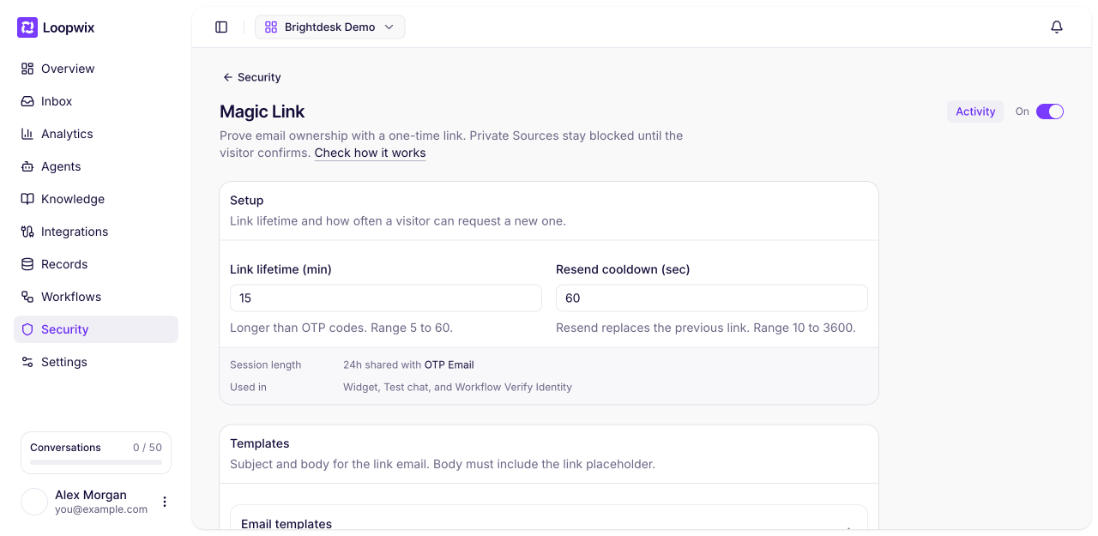
Setup
| Setting | Meaning | Default |
|---|---|---|
| Link lifetime (min) | How long a link works. Longer than OTP codes. Range 5 to 60 | 15 |
| Resend cooldown (sec) | Resend replaces the previous link. Range 10 to 3600 | 60 |
| Session length | Shown as shared with OTP Email (24 h by default) | n/a |
| Link host | The address links point to | set by your deployment |
Select Save, then Send test email to try it.
Templates and activity
The link email must contain the link placeholder: see Verification email templates. Activity lists link requests and confirmations.
Send the visitor back to your page
When a visitor asks for a link from your site, the widget tells Loopwix which page they were on. After they confirm, the confirmation page can offer a return link to that page. For safety it only appears when the page is on your workspace's own website, with or without www.. Any other address is ignored, so a crafted link cannot send a verified visitor to a different site. The widget keeps checking in the background, so the chat in the original tab unlocks as soon as the link is confirmed. You do not configure anything for this beyond saving your website address in the workspace settings.
Good to know
- Because the visitor must press Continue, security scanners that "click" links cannot verify a session.
- A new link replaces the previous one.
Used for: Security at Loopwix
OTP Email
Turn on one-time email codes, tune code lifetime, attempts, resend cooldown and session length, send a test email and read verification activity.
Verification email templates
Preview, activate and customise the OTP and Magic Link emails, with the HTML editor and the Design with AI assistant, and send a test.