
Add website pages
Enter a public website address, let Loopwix discover linked pages, choose which to import, review them and add them as knowledge.
You can import public web pages, such as your help center, as knowledge. You choose which pages to add.
How do I train my AI agent on my website?
Select Knowledge, choose Website and enter a public website address, such as your help center. Loopwix discovers the linked pages. Select the pages to preview, review them and add them as knowledge. Only public pages can be read, and you choose exactly which ones to add.
Import pages
- Select Knowledge, then choose Website. The dialog Add website pages opens: "Choose which pages to preview and add to Knowledge."
- Enter a website URL. Use a public address; a help center or docs address works best. Loopwix discovers linked pages. Only public pages can be read.
- Select pages to preview. Choose at least one ("Select at least one page"). If a page is missing, use Missing a page? to add it.
- Review content: check the Extracted content of each page. You can clean it up ("Clean the extracted content before adding it.") by editing the text. A page must contain some content.
- Add the pages. Loopwix confirms "Pages added. Configure them when processing finishes."
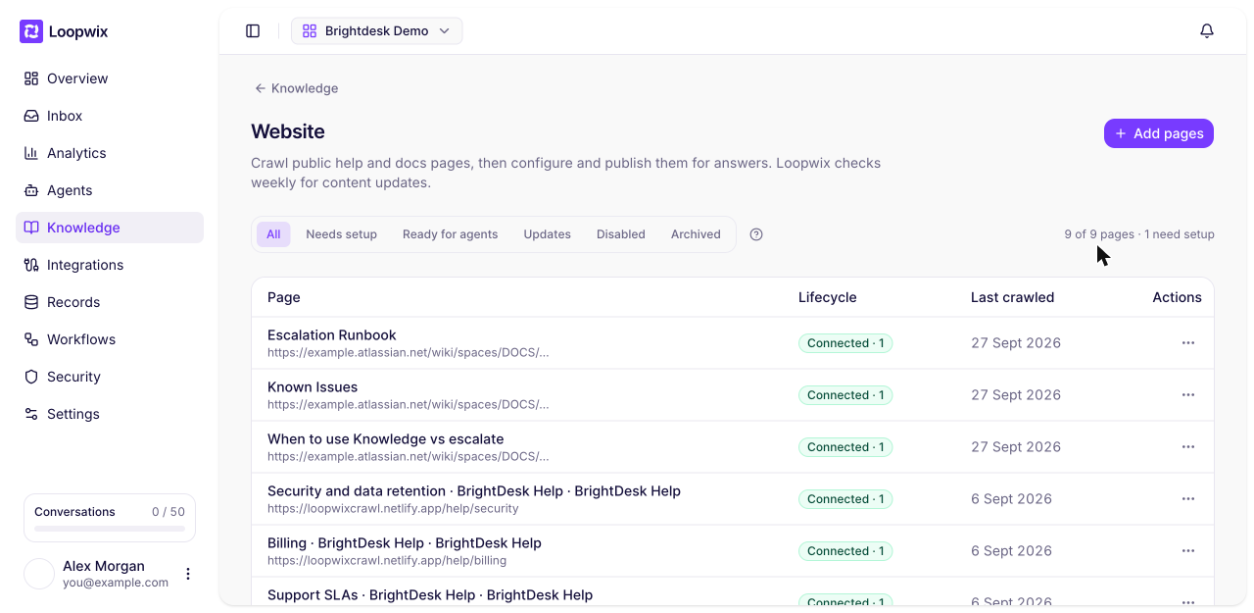
Each page becomes its own knowledge item. Citations for website items link to the page address by default.
Limits
| Limit | Value |
|---|---|
| Pages found when you enter an address | Up to 25 |
| Pages you can add in one step | Up to 15 |
| Page content (preview and edits) | 200,000 characters |
The pages per import also depend on your plan; see Limits and formats.
After adding
Each page follows the normal route: configure and publish it and attach it to an agent. Open Manage crawled pages to see them all. You can turn pages off for answers (Page disabled for answers), archive them (restorable) or delete them; see Remove knowledge.
What works best
- Public help centers, docs and FAQ pages with real text.
- Pages that describe one topic.
- Not a good fit: pages behind a login, pages that load their content only with scripts, or pages that are mostly images. Copy the content into a text note instead.
Freshness
Loopwix can tell you when a page has changed at its source; see How website freshness works.
Problems
Add a text note
Type or paste a note as knowledge, edit it with the rich editor, save it to the knowledge base, then review and publish.
How website freshness works
How Loopwix checks imported website pages for changes, what Update available, Source removed and Check failed mean, and how you review updates.