
Attach knowledge
Choose which published knowledge an agent may use in its answers by ticking items in the agent's Knowledge section and saving.
An agent answers from knowledge only when the item is ready, published and attached to that agent. This page covers the last step: attaching.
Attach knowledge
- Open the agent and select Knowledge. The section says "Published knowledge this agent may use in answers. Changes apply when you Save."
- Search the list if needed. A search box appears when more than eight items are available.
- Tick the items this agent may use. Attached items are grouped under Attached, the rest under Available.
- Check the counter at the bottom, for example "2 selected of 6 available".
- Select Save draft. Changes apply when you publish.
If nothing is attached the section says "Nothing attached. This agent will not use knowledge in answers until you select assets below."
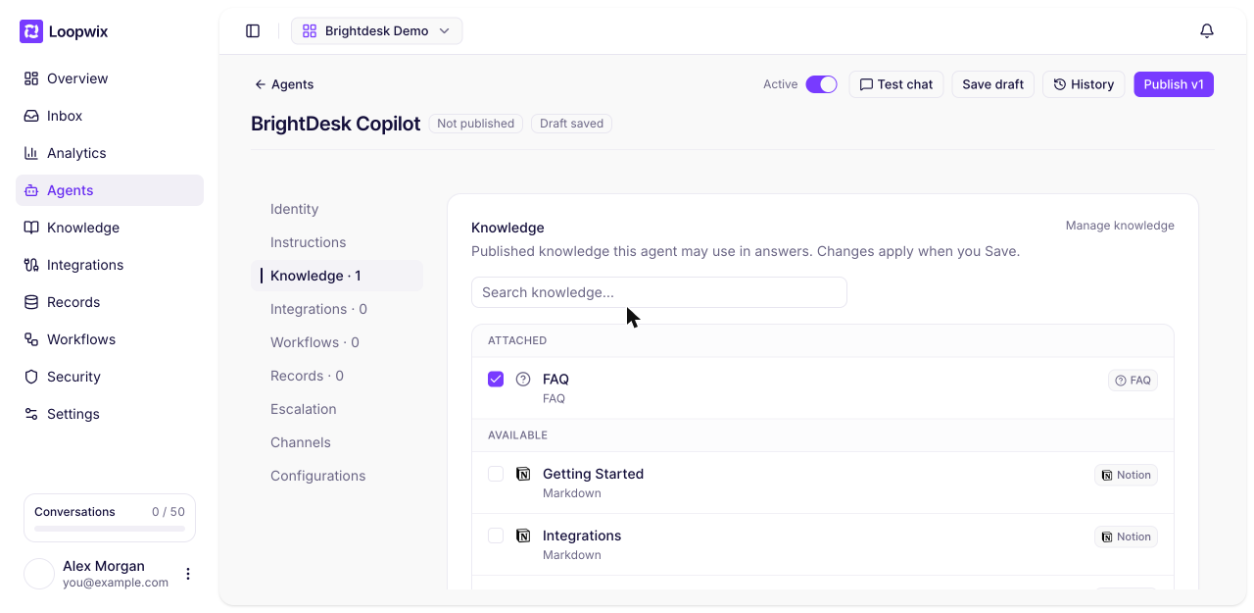
Which items appear
The list shows only items that are finished and usable. An item appears when all three are true:
- It has finished processing (its status is ready).
- It is published.
- Use in answers is on for it.
If the list is empty it says to publish assets on the Knowledge page first, with an Open Knowledge link. Manage knowledge opens the Knowledge library. See Configure and publish a knowledge item.
One item, many agents
Knowledge belongs to the workspace, so you can attach the same item to several agents. Changing the item changes what every attached agent can say, once the item is published again.
Check it worked
- In the Knowledge library, attached items show Connected · N, where N is the number of agents using them.
- In Test chat, ask a question the item answers and check the source.
Limits
An agent can have up to 500 knowledge items attached.
Tips
- Attach only what the agent should talk about. Fewer, better items give sharper answers.
- If the agent should never discuss something, do not attach it.
Not working?
Write good instructions
How to write the agent's system instructions: where to enter them, the length limit, what to include and avoid, and examples.
Attach integrations
Give an agent access to connected systems by adding an integration, choosing which capabilities it may use, and writing when it should use them.