
How languages work
Choose your languages and tone, read the language quality labels honestly, understand knowledge in other languages, and use translation in the Inbox.
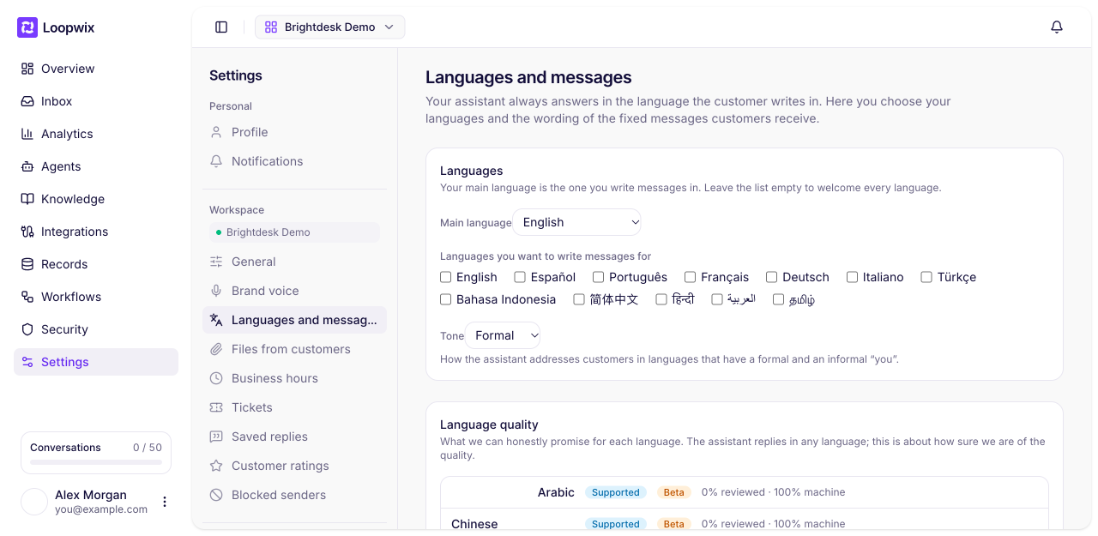
Open Settings → Workspace → Languages and messages (Admin and above). "Your assistant always answers in the language the customer writes in. Here you choose your languages and the wording of the fixed messages customers receive."
Does my AI agent answer in the customer’s language?
Yes. Your agent answers in the language the customer writes in. In Settings, then Workspace, then Languages and messages, you choose your main language, your other languages and the wording of fixed messages. Each language shows a quality label, so you know how well it is supported. This is in beta.
Settings
| Setting | Meaning |
|---|---|
| Main language | The one you write messages in (e.g. English, Español, Português, Français, Deutsch, Italiano, Türkçe, Bahasa Indonesia, 简体中文, हिन्दी, العربية, தமிழ்) |
| Languages you want to write messages for | The set of languages whose fixed messages you will author. "Leave the list empty to welcome every language" |
| Tone | Formal or Informal: how the assistant addresses customers in languages with a formal and an informal "you" |
Language quality
The page labels each language so promises stay honest. "The assistant replies in any language; this is about how sure we are of the quality." Each language shows Supported and, for some, a Beta badge. It also shows how much of its wording is reviewed by people, machine-generated, or falls back to English. Languages with more than one written form (for example Chinese) let you pick the form (Simplified by default). The full list is in Supported languages.
Your knowledge by language
Tell Loopwix which language your documents are written in. Customers who write in another language still get answers from them; quality is best when knowledge and question languages match. See How answers use knowledge.
Fixed messages
Greetings, handoff and verification messages can be written per language. Your escalation handoff message and email templates are examples.
The chat widget's own interface text (buttons, hints and error messages) is loaded per language from Loopwix, so you do not translate it yourself. It starts in the visitor's browser language and, when the visitor writes in another language that Loopwix has interface text for, switches to that language. If there is none, the widget keeps its current language.
Team languages and translation
- Each teammate sets The language I read and Languages I can answer in (Your profile); teams set the languages they answer in (Teams).
- In the Inbox a teammate can write in their language and send in the customer's, after reviewing the translation. Inbox translation is not switched on by default; ask Loopwix to turn it on for your workspace.
- Analytics shows the languages customers write in (Volume).
Languages and attachments
Run your Loopwix agent in several languages, translate conversations in the Inbox, and let customers send photos, documents and voice messages. Beta.
Files from customers
Let customers send documents, images and voice messages, set limits and handling, watch the overview and override per agent.