
Connect WhatsApp to your AI agent
Connect WhatsApp through Meta Cloud API: create the app, a permanent token, paste the credentials, set the webhook and go live with a real number.
You need a Meta account. A test number is free and instant; a real number needs Meta business verification.
How do I connect WhatsApp to my AI agent?
Create a Business app at Meta for Developers and add the WhatsApp product. Create a permanent token, paste your credentials into Loopwix and set the webhook. A test number is free and instant. A real number needs Meta business verification. WhatsApp is in beta.
1. Create the Meta app
- At Meta for Developers create an app of type Business (use case "Connect with customers through WhatsApp") and add the WhatsApp product. Meta creates a WhatsApp Business Account and a test phone number.
- In WhatsApp → API Setup note the Phone number ID (the long number under "From", not the phone number). In "To", add up to five recipient numbers to test with.
- In Settings → Basic copy the App secret. It lets Loopwix verify that each message really comes from Meta.
2. Create a permanent token
Do not use the 24-hour token. In Meta Business settings go to Users → System users and add one (Admin). Assign your app and your WhatsApp account (full control). Then Generate token with whatsapp_business_messaging and whatsapp_business_management, and expiry Never.
3. Connect in Loopwix
- Agent → Channels → WhatsApp: paste Phone number ID, Access token and App secret (WABA ID optional) and select Save and continue.
- Copy the Callback URL and Verify token shown.
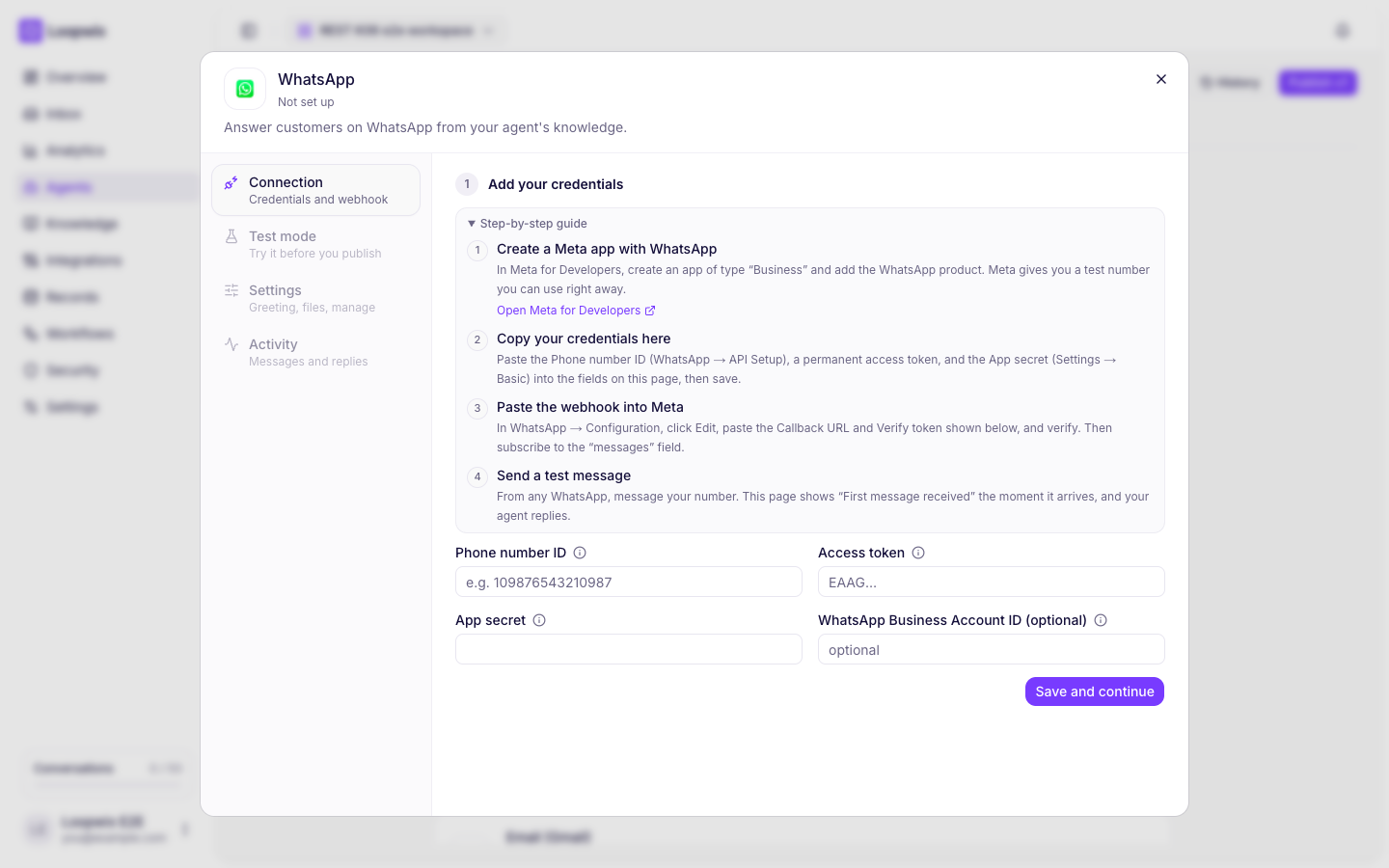
- In Meta: WhatsApp → Configuration → Webhook → Edit, paste both, Verify and save, then subscribe to the messages field.
- Message the test number from an allowed recipient. Meta apps that are not live only deliver messages from people added as testers.
4. Go live with your real number
- Complete business verification in Meta.
- Add and verify your phone number and display name (Meta reviews it).
- Edit the Loopwix connection to use the new number's Phone number ID.
- Switch the Meta app to Live and add a privacy policy URL.
- Add a payment method. Meta charges per delivered message, by category; see WhatsApp costs and rules.
- Publish the agent and test.
What customers can do on WhatsApp
Customers get the same agent as on your website chat: the same knowledge, instructions and workflows. They can:
- Ask questions and get answers from your published knowledge.
- Verify their email by typing a 6-digit code into the chat, then ask about their own orders or bookings.
- Confirm or cancel an action with Yes and No buttons. Nothing changes until they tap Yes.
- Send photos, documents and voice notes, once you turn files on for the connection.
- Ask for a person. Hand-over is switched on by Loopwix on request; see Set up escalation.
A short example:
Customer: Do you deliver on Sundays?
Agent: We deliver Monday to Saturday. Orders placed on Sunday ship on Monday morning.
Customer: Can I change my delivery address?
Agent: To continue I need to verify your email address first. What's your email? (Reply CANCEL to skip.)
What Loopwix can access
- whatsapp_business_messaging lets Loopwix receive messages sent to your number and send replies from it.
- whatsapp_business_management lets Loopwix read your WhatsApp Business account details.
- The App secret lets Loopwix check that each message really came from Meta. It is not used to send anything.
Loopwix only sees messages sent to the connected number. Your token and App secret are stored encrypted and never shown again.
Rules to know
- 24-hour window: free-form replies only within 24 hours of the customer's last message. Loopwix does not send message templates today, so it cannot start a conversation or reply after the window closes.
- Costs: Meta charges your Meta account per delivered message. Rates depend on the category and the customer's country. See WhatsApp costs and rules.
- Opt-out: "STOP" is honoured automatically, and "START" subscribes the customer again.
- Files: photos, documents and voice notes are off until you turn them on (Files).
- Message length: a reply can be up to 4,096 characters. Longer answers are split into several messages.
Meta's WhatsApp Business Platform documentation is the source for these rules.
Can I use my existing WhatsApp number?
Yes, once it is registered with the WhatsApp Business Platform in Meta. A number used in the WhatsApp app has to be moved to the platform first. Meta's documentation explains the options.
What happens outside the 24-hour window?
The agent and your team cannot message the customer. Their next message opens a new window. See WhatsApp costs and rules.
Do I need Meta business verification?
Not to test: a Meta test number works at once with up to five recipient numbers. To answer customers on your own number, Meta asks for business verification and reviews your display name.
Troubleshooting
| Symptom | Fix |
|---|---|
| Meta cannot validate the callback | Save the connection first; paste the token without spaces |
| Messages arrive but no reply | Read Activity for window closed, opted out, expired token or unpublished agent |
| Signature errors | Wrong App secret (one per Meta app) |
| Nothing arrives | The messages field is not subscribed, or you are not a tester |
Telegram
Create a Telegram bot with BotFather, paste its token into Loopwix, and chat with your AI agent on Telegram in about five minutes. Beta.
WhatsApp costs and rules
How WhatsApp Business Platform pricing, message templates, the 24-hour window and opt-in work, in plain words, and what Loopwix does in each case.