
Pause or switch off
Use the Active switch to take an agent out of service or bring it back, and know when to deactivate, roll back or delete instead.
You can take an agent out of service without deleting anything. Use the right control for the situation.
How do I take my agent offline?
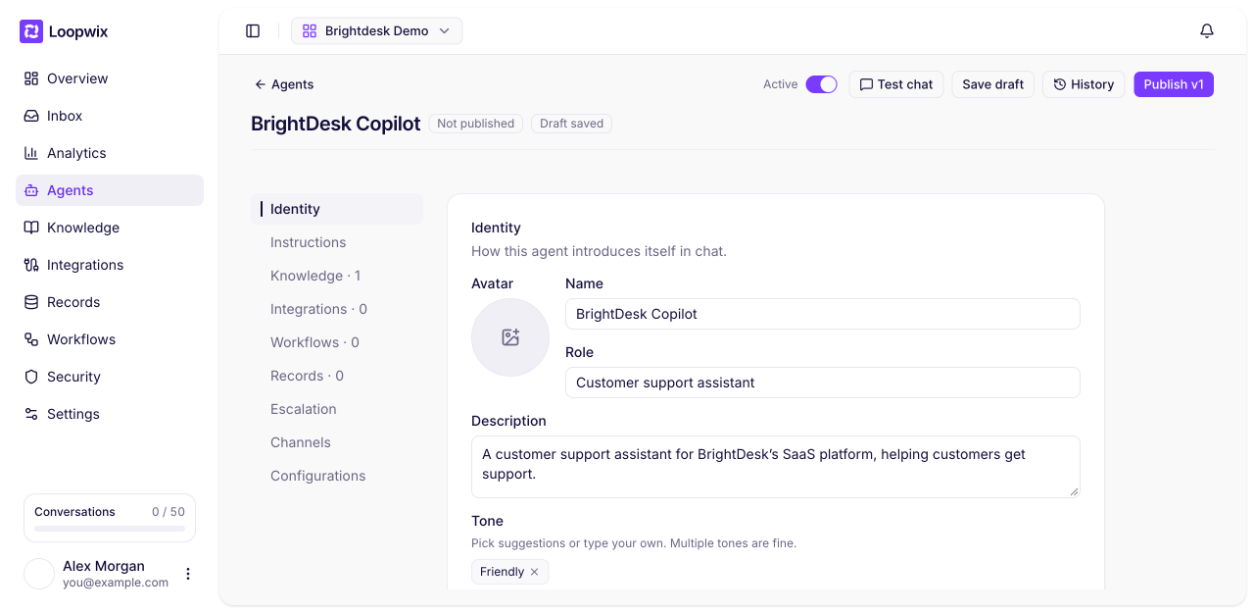
Use the Active switch in the agent toolbar or on its card, and set it to Inactive. The website chat then refuses new conversations until you switch it back to Active. Nothing is deleted, so you can turn the agent on again at any time.
The Active switch
The Active switch is in the agent toolbar and on each agent card. Switch it to Inactive to take the agent out of service: the website chat refuses new conversations until you switch it back to Active. Loopwix confirms with Agent activated or Agent deactivated.
- The switch takes effect straight away and does not need publishing.
- Nothing is lost: identity, instructions, attachments and versions all stay.
- Existing knowledge, tickets and history are untouched.
- Inactive agents are shown as Inactive on the card and in the header.
Choose the right action
| You want to… | Do this |
|---|---|
| Stop the agent for a while | Switch it to Inactive |
| Undo a bad change | Make an earlier version live; see Versions and rollback |
| Stop the website chat everywhere, right now | Use Turn off website chat in Advanced settings. Visitors will not see the chat button and cannot start new conversations |
| Pause a whole client or brand | Pause the workspace; see Create, switch and pause workspaces |
| Stop tools or spending immediately | Use Runtime controls |
| Remove the agent for good | Delete it |
Emergencies
People with the right permission (Owner, Admin and Builder by default) can switch an agent off in an emergency. The Security section also has kill switches for tools and a way to cap spending. See Runtime controls and Usage and budgets.
Tell your customers
If you switch an agent off, make sure customers have another way to reach you, such as a contact form or email. That way they are not left without help.
Turning it back on
Switch Inactive to Active again. The agent resumes with the last published version.
Used for: Security at Loopwix