
Test your agent
Use Test chat to talk to your draft agent as a customer would, check answers and sources, and find gaps before you publish.
Test chat lets you talk to your agent before customers can. Use it after every meaningful change.
How do I test my agent before customers see it?
Open the agent and select Test chat in the toolbar. Ask the questions your customers ask, read each answer and check where it came from. Test chat uses the last saved draft, so save your edits first. Use it after every meaningful change.
Open and use it
- Open the agent and select Test chat in the toolbar. A panel opens beside the editor, titled Test chat, with a Type a message… box (or your agent's own placeholder text).
- Ask questions your customers ask.
- Read the answer and check where it came from.
- Close the panel with Close test chat.
The panel says "Live replies use the last saved draft". If you have unsaved edits it adds "Unsaved edits won't affect replies until you save." with a Save draft button.
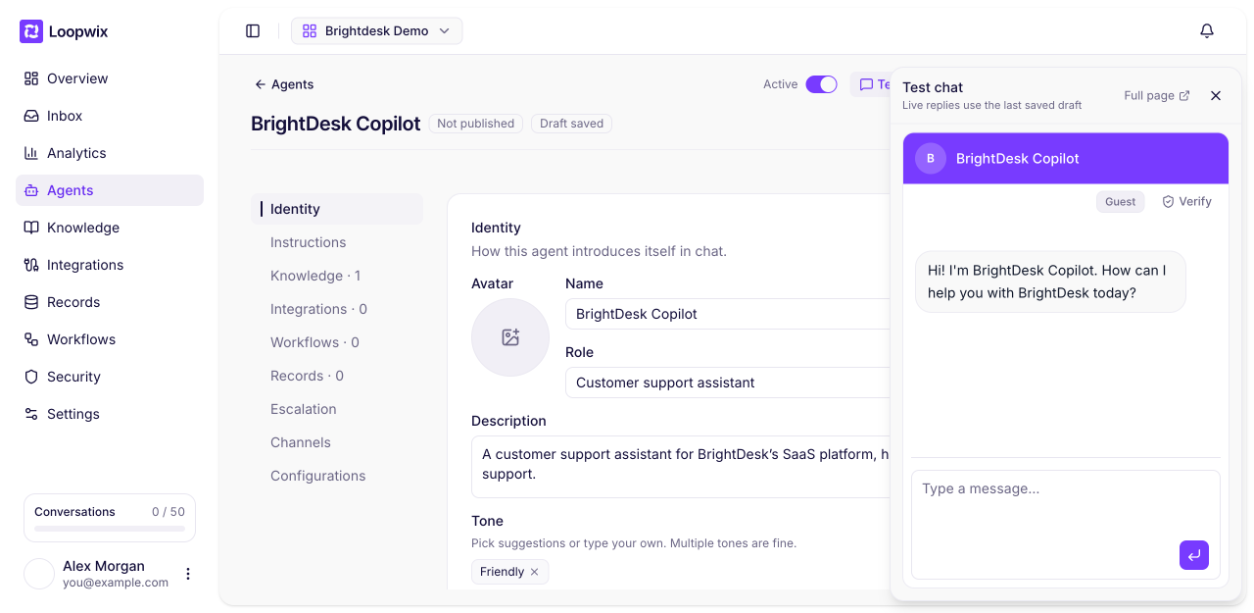
Full page
Select Full page in the panel header to open a larger preview page for the agent. Use it to check how the chat looks and reads at full size.
What to test
| Test | Why |
|---|---|
| The top ten questions customers ask | The basics must be right |
| A question your knowledge does not cover | Checks the fallback message |
| A request for a person | Checks escalation |
| A question phrased differently from your content | Checks that retrieval finds the right item |
| A sensitive request as a guest | Confirms private data and actions stay locked without verification |
| The same request after verifying | Confirms the verified path works. See Trust and verification |
| Tone and length of answers | Matches your brand |
See the model's reasoning
Turn on Show agent thinking process in Configurations to stream the reasoning while Test chat works. This helps when an answer is surprising.
Test knowledge on its own
You can also test knowledge before attaching it; see Test your knowledge.
When replies are not what you expected
| What you see | Likely cause |
|---|---|
| Old behaviour after you changed something | The change was not saved; use Save draft |
| "I don't know" answers | Knowledge not published or attached; see Attach knowledge |
| It does not use a tool | The capability is not enabled, attached or allowed for this trust level |
Test chat limits
Test chat counts toward a daily message allowance that depends on your plan. See Limits.
Preview a customer's view
The agent also has a preview page that shows how the website chat looks. See Publish and control your chat.
Configurations
The Configurations section of an agent: switch on Show agent thinking process to see the model's reasoning in Test chat while you debug answers.
Publish an agent
Publish your Loopwix agent: the saved draft becomes a numbered version that customers see. Pass the security check, then republish or roll back later.