
Runtime controls (kill switches)
Switch off an agent, tool, integration, workflow, MCP server, knowledge source, visitor session or whole workspace at once, with an audited reason.
Runtime controls are your emergency brakes. "What you disable stops immediately for visitors, and every change is audited with your reason."
Open Security → Security settings → Runtime controls. Only workspace owners and admins can change them.
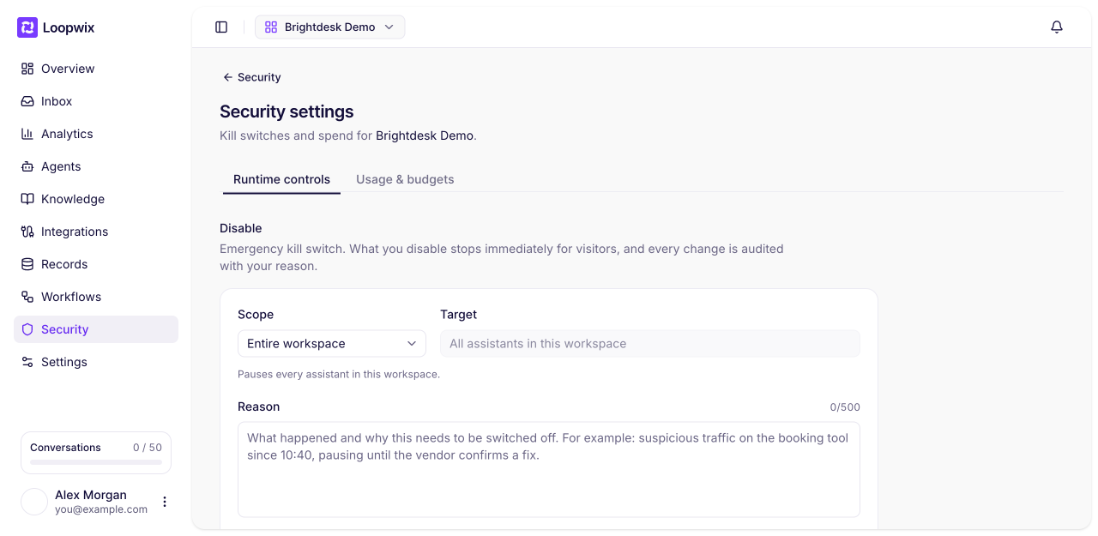
Disable something
-
Choose a Scope:
Scope Effect Entire workspace Pauses every assistant in this workspace Agent Stops one assistant from replying to visitors Tool Blocks a single tool or action from running Integration Blocks every tool that uses this connection Workflow Stops this workflow from being triggered MCP server Blocks every tool served by this MCP server Knowledge source Removes this source from assistant answers Visitor session Ends one visitor's chat session (paste the session ID from the conversation) -
Pick the Target (not needed for the entire workspace).
-
Write a Reason (up to 500 characters), for example "suspicious traffic on the booking tool since 10:40, pausing until the vendor confirms a fix".
-
Select Disable. It "takes effect within about a second".
Review and undo
Active controls lists everything currently switched off: scope, target, reason and when. Use the row's actions menu to switch the thing back on. "Nothing is disabled" means all clear.
Runtime control or the Active switch?
- The agent Active switch is a normal on/off for one agent; see Pause or switch off.
- Runtime controls reach further (a single tool, an integration, one session) and are logged with a reason. Builders also have an emergency switch-off permission for an agent.
During an incident
- Disable the narrowest scope that stops the harm (a tool or an integration before the whole workspace).
- Write a clear reason.
- Investigate in the Inbox and activity.
- Remove the control when fixed.
Used for: Security at Loopwix
Verification email templates
Preview, activate and customise the OTP and Magic Link emails, with the HTML editor and the Design with AI assistant, and send a test.
Usage and budgets
See today and this month spend and turns, and understand the five service levels from Normal to Unavailable as a budget is used up.