
Identity
Set how an agent introduces itself: its avatar, name, role, an admin-only description, tone, welcome message and fallback message.
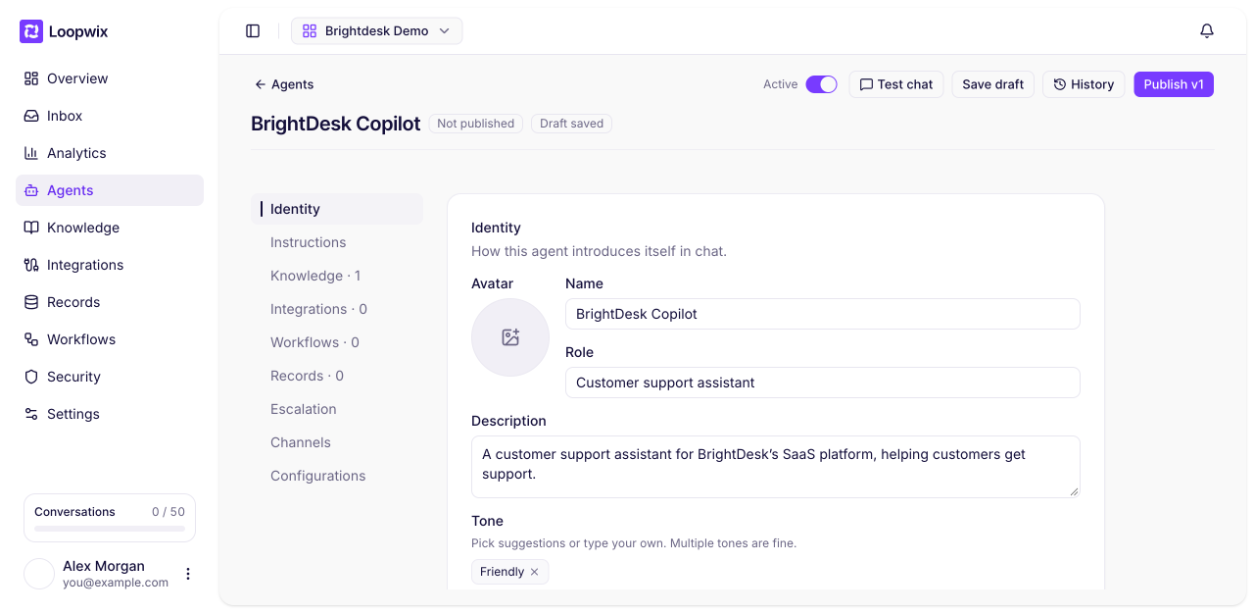
Identity is how the agent introduces itself: the face, name and voice customers meet before anything else. Open the agent and select Identity. The section is described as "How this agent introduces itself in chat."
How do I change my agent's name and avatar?
Open the agent and select Identity. Set the avatar, name and role customers see, an admin-only description, the tone, and the welcome and fallback messages. Then save. Identity is how the agent introduces itself, so customers meet it before anything else.
Fields
| Field | Required | Limit | What it does |
|---|---|---|---|
| Avatar | No | PNG, JPG, WebP or GIF | A picture shown in chat. |
| Name | Yes | 120 characters | What the agent is called. |
| Role | No | 120 characters | A short description of its job, for example "Hotel guest support". |
| Description | No | 500 characters | A note for your team about what this agent is for. Admin-only; customers do not see it. |
| Tone | Yes | 8 tones | How it sounds. See Tone and voice. |
| Welcome message | Yes | 1,000 characters | The first message customers see. See Welcome and fallback messages. |
| Fallback message | Yes | 1,000 characters | What the agent says when it cannot help. |
If a required field is empty when you save, you see a message. Examples are Name is required, Add at least one tone, Welcome message is required and Fallback message is required.
The avatar
Select the round image to upload, hover to replace it, and use the × to remove it. Square images look best. Loopwix shrinks the picture to fit within 256 pixels and stores it with the agent. If it is still too large after resizing you see "Image is still too large after resizing. Try a simpler photo." Choose a simpler image, or a non-image file gives "Choose an image file (PNG, JPG, or WebP)."
The avatar is also used as the logo in the website chat. See Appearance.
Name and role
The name is what customers see the agent called, and it is also the website chat title when you first create the agent. The role is a short sentence that helps you and the model understand the agent's job. It is not a long instruction, so put rules in Instructions.
Save
Select Save draft. The header shows Draft saved. Your changes reach customers when you publish. Use Test chat to try them first; it replies from the saved draft.
Tips
- Use a name your customers will recognise as the voice of your business.
- Keep the role to one line.
- Write welcome and fallback messages for a customer who has never heard of Loopwix.
Create an agent
Create an agent from the Agents page by entering a name and optional description, optionally cloning the attachments of an existing agent.
Tone and voice
Choose up to eight tone words for an agent, such as Friendly or Professional, and learn how tone differs from instructions and brand voice.