
Test your knowledge
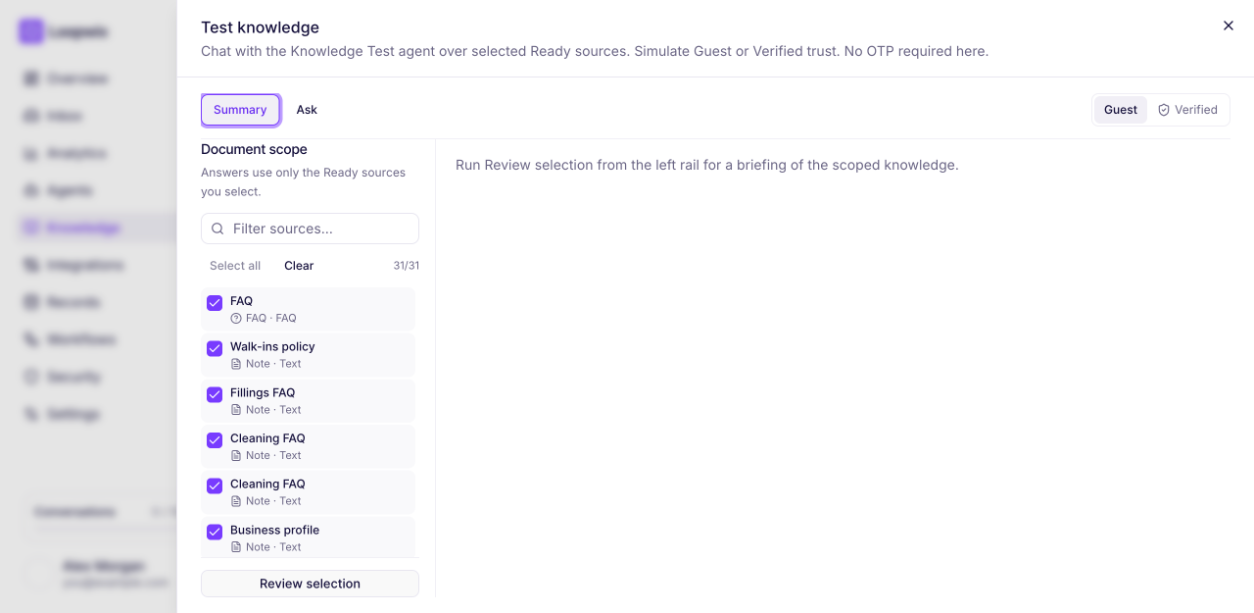
Chat against selected Ready documents before attaching them to an agent, review what your knowledge contains, and find gaps.
Use Test knowledge to check your content before an agent depends on it.
How do I check what my agent knows before it goes live?
Select Knowledge, then Test knowledge, and choose the Ready documents to test against. Ask the questions your customers ask, and open the sources shown with each answer. This checks your content on its own, before any agent depends on it, so you can fix gaps first.
Run a test
- Select Knowledge, then Test knowledge.
- In Document scope, choose the Ready documents to test against (use Filter sources… to find them). You must select at least one: "Select at least one Ready document to chat against."
- Ask questions in the chat ("Ask about your knowledge"). Open the sources shown with answers (Open document).
- Use Review selection (then Review knowledge or Refresh review) for a short briefing of what the selected knowledge contains.
- Turn on Show agent thinking process to see reasoning.
The panel notes "Answers use retrieved Ready documents and Active live sources." Ready documents that are not yet published can be tested too, so you can check the draft first.
To check answers that depend on identity, simulate a guest, an Identified visitor or a Verified customer. To verify, use an email code with Verify identity. If the agent needs confirmation before an action, it asks you first ("Please confirm before I continue. Nothing has been changed yet.").
What to try
| Test | Why |
|---|---|
| Ten real customer questions | The basics must be right |
| Two questions the knowledge should not answer | Checks the fallback and the "when not to use" guidelines |
| The same question worded differently | Checks retrieval |
| A question as a guest versus verified | Checks identity-dependent answers |
After testing
Fix gaps by editing guidelines or adding items, publish, attach to the agent and then test in Test chat, which uses the agent's real settings.
Difference from Test chat
Test knowledge tests content you choose. Test chat tests a whole agent, including its instructions and attachments.
Citation modes
Choose how each knowledge item shows its source in an answer: Answer only, Title, Excerpt or Link to source URL, so customers can check the facts.
Remove knowledge: disable, archive or delete
Three ways to stop using knowledge: disable it (turn off use in answers), archive it (restorable) or delete it (permanent).