
Connect Gmail
Let your agent read an inbox and reply in the customer's own thread, using a small Google Cloud project with Gmail push notifications.
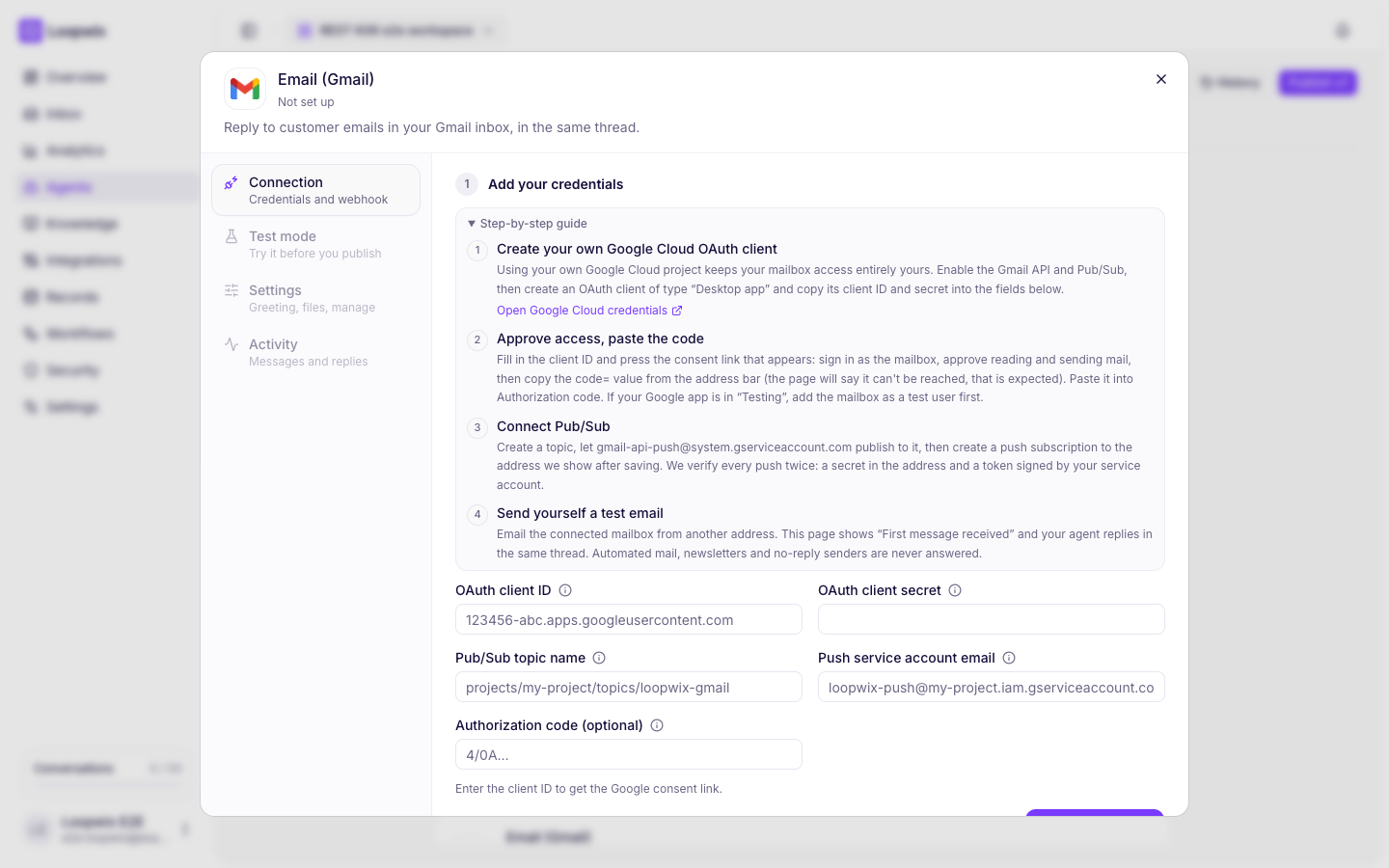
Loopwix watches an inbox through Gmail push notifications (Google Pub/Sub) and replies inside the customer's thread. You create a small Google Cloud project once; allow about 15 minutes. This is separate from the Gmail integration, which lets an agent act with a customer's mailbox.
How do I let my AI agent answer customer emails?
Create a small Google Cloud project with Gmail push notifications, which takes about 15 minutes. Then connect the inbox in Loopwix from the agent's Channels section. The agent replies inside each customer's own email thread. The Gmail channel is in beta, so finish with a real test conversation.
1. Google Cloud project
- Create a project and enable the Gmail API and Cloud Pub/Sub API.
- OAuth consent screen: user type External, app name and email, add the scopes
gmail.modifyandgmail.send, and add your mailbox as a Test user. While in Testing mode, authorisation expires after 7 days. - Credentials → OAuth client ID (Desktop app): copy the Client ID and Client secret.
2. Pub/Sub
- Create a topic and copy its full name (
projects/<project>/topics/<name>). - On the topic add
[email protected]as Pub/Sub Publisher (the Loopwix sheet shows this exact value). - Create a service account and let the Pub/Sub service agent create tokens for it.
- After you save in Loopwix (step 3 below), create a Push subscription on the topic. Its endpoint is the push address the Loopwix sheet shows after saving. Turn on authentication with that service account.
Create the topic and permissions before saving: the watch needs the topic.
3. Connect in Loopwix
- Agent → Channels → Email (Gmail): paste the OAuth client ID, OAuth client secret, Pub/Sub topic name and Push service account email.
- Open the Google consent link, sign in with the mailbox and approve both permissions. The browser then lands on a
localhostpage that fails to load: that is expected. Copy the value aftercode=from the address bar. - Paste it into Authorization code (optional) within a few minutes (it works once) and select Save and continue.
- Loopwix starts the inbox watch and renews it automatically. Email the address from another account to test; the agent replies in the same thread.
What customers can do by email
Customers email your support address as they do today. The agent replies in the same thread, from the same address. They can:
- Ask questions and get answers from your published knowledge.
- Send attachments, such as a PDF invoice or a photo, for the agent to read.
- Verify their email with a 6-digit code, then ask about their own orders or bookings.
- Confirm an action by replying "yes", or cancel it by replying "no". Email has no buttons.
- Ask for a person. Hand-over is switched on by Loopwix on request; see Set up escalation.
A short example:
Subject: Return for order 1042
Customer: Hi, how long do I have to return a jacket I bought last week?
Agent (reply in the same thread): You can return unworn items within 30 days of delivery. Start a return from the link in your order confirmation email.
What Loopwix can access
You approve two Google permissions for the mailbox:
- gmail.modify lets Loopwix watch the inbox and read new mail that arrives in it. Loopwix does not delete or move mail.
- gmail.send lets Loopwix send replies from the mailbox.
Use a shared support mailbox, not a personal one, because Loopwix can read the mail in it. The Client secret and the Google authorisation are stored encrypted. Google's push notification guide explains how the inbox watch works.
Behaviour
- Mail from no-reply or notification senders, newsletters, bounces and your own address is never answered. A contact gets at most 10 automatic replies per day.
- Attachments are read and, if some cannot be read, the reply names them.
- Replies can be up to 20,000 characters, so long answers stay in one email.
- Use Blocked senders to stop specific addresses or domains.
- If the 7-day test-mode expiry hits, the channel shows Needs attention: reconnect with a fresh code.
Can I use a Google Workspace address?
Yes. Any mailbox you can sign in to with Google works, including Google Workspace addresses. Use a shared support mailbox rather than a personal one.
Will the agent reply to newsletters and notifications?
No. Mail from no-reply and notification senders, newsletters, bounces and your own address is never answered.
Why did the channel stop after a week?
Your Google project is still in Testing mode, where Google ends the authorisation after 7 days. Reconnect with a fresh code. To stop this, move the Google app to production, which Google may review first.
Is this the same as the Gmail integration?
No. The channel answers customers who email you. The Gmail integration lets an agent work with a mailbox during a chat, such as drafting an email.
Troubleshooting
| Symptom | Fix |
|---|---|
| Watch fails | Publisher permission or Pub/Sub API missing |
| "Code invalid" | Codes work once and expire; open the consent link again |
| No replies | Check Activity; agent must be published or the sender on the test list |
Connect Messenger and Instagram
Connect a Facebook Page for Messenger or an Instagram professional account for DMs to your Loopwix AI agent through your own Meta app. Beta.
Inbox and escalation
How a conversation moves from your AI agent to a teammate in the Loopwix Inbox: handover, the ticket queue, replies, assignment and closing.