
Connect Messenger and Instagram
Connect a Facebook Page for Messenger or an Instagram professional account for DMs to your Loopwix AI agent through your own Meta app. Beta.
Both use a Meta app with a webhook, like WhatsApp. Until your Meta app is Live, only people with a role on the app (admin, developer, tester) get replies.
How do I connect Instagram DMs to my AI agent?
Add the Messenger or Instagram product to your Meta app and connect your Facebook Page or Instagram professional account. Paste the credentials in Loopwix and set the webhook, as for WhatsApp. Until your Meta app is Live, only people with a role on the app get replies. Both are in beta.
Messenger (Facebook Page)
- In your Meta app add the Messenger product and connect your Facebook Page (you must be its admin).
- Generate a Page access token. Copy the Page ID and the App secret (Settings → Basic).
- Agent → Channels → Messenger: paste Page ID, Page access token, App secret, then Save and continue.
- In Meta Messenger → API setup → Webhooks, paste the Callback URL and Verify token, verify, and subscribe the Page to messages and messaging_postbacks.
- Add yourself as a Tester in the app, then message the Page.
Going live: App Review for pages_messaging (with a screencast), business verification if asked, a privacy policy URL, then switch the app to Live. Use a long-lived Page token. The same 24-hour reply window as WhatsApp applies.
Instagram DMs
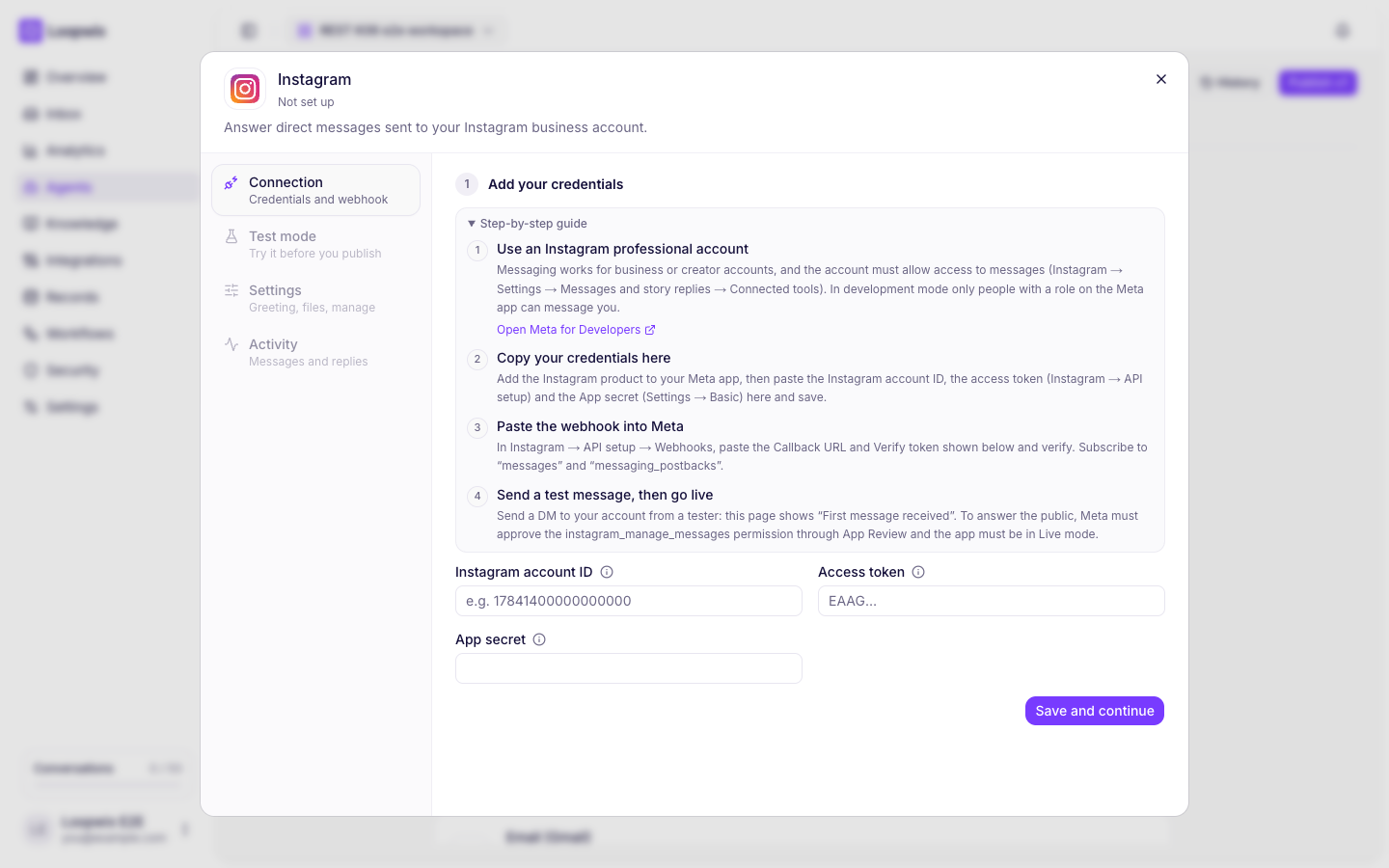
- Convert the Instagram account to Professional and allow access to messages for connected tools (Instagram settings → Messages and story replies).
- Add Instagram messaging to your Meta app and connect the account.
- Copy the Instagram account ID (digits, not the @username), an access token with
instagram_manage_messages, and the App secret. - Agent → Channels → Instagram: paste them and select Save and continue.
- In Meta Instagram → API setup → Webhooks paste the Callback URL and Verify token, verify, subscribe to messages and messaging_postbacks.
- Send a DM from a tester account.
Going live: App Review for instagram_manage_messages, business verification, app Live. Instagram tokens can expire (long-lived ones last about 60 days): renew before expiry. Customers can send photos and voice; documents are not supported by Instagram, and shared posts or story mentions are read as a short note.
What customers can do on Messenger and Instagram
Customers message your Facebook Page or Instagram account as they always do. They get the same agent as on your website chat. They can:
- Ask questions and get answers from your published knowledge.
- Verify their email by typing a 6-digit code into the chat, then ask about their own orders or bookings.
- Confirm or cancel an action with Yes and No buttons.
- Send photos and voice messages, and on Messenger documents too, once you turn files on for the connection.
- Ask for a person. Hand-over is switched on by Loopwix on request; see Set up escalation.
A short example on Instagram:
Customer: Hi! Is the blue jacket from your last post still in stock?
Agent: The blue jacket is in stock in sizes S to L. You can order it on our website.
What Loopwix can access
- pages_messaging (Messenger) lets Loopwix receive messages sent to your Page and reply to them.
- instagram_manage_messages (Instagram) lets Loopwix receive DMs sent to your professional account and reply to them.
- The App secret lets Loopwix check that each message really came from Meta.
Loopwix does not post to your Page or feed, and does not read comments. Tokens are stored encrypted and never shown again.
Rules and limits
- 24-hour window: you can reply freely within 24 hours of the customer's last message. After that, replies are blocked until the customer writes again. Meta's messaging policy sets this rule for both apps.
- Message length: up to 2,000 characters on Messenger and 1,000 on Instagram. Longer answers are split into several messages.
- Opt-out: "STOP" is honoured automatically, and "START" subscribes the customer again.
- Instagram files: Instagram DMs carry photos and voice, not documents.
Meta's Instagram messaging documentation covers the Instagram side.
Can the agent answer comments on my posts?
No. Loopwix answers direct messages on Messenger and Instagram. It does not read or reply to comments.
Why does only my team get replies?
Your Meta app is not Live yet. Until it is, Meta only delivers messages from people with a role on the app. Complete App Review and switch the app to Live.
Do I need a separate Meta app for each channel?
No. One Meta app can carry WhatsApp, Messenger and Instagram. Each channel has its own connection in Loopwix, with its own token.
Troubleshooting
| Symptom | Fix |
|---|---|
| "Callback URL or verify token couldn't be validated" | Save first; paste exactly; check the address |
| No messages arrive | Event not subscribed, app not live and you are not a tester, wrong Page or account |
| Messages arrive, no reply | Activity shows window closed, expired token or unpublished agent |
WhatsApp costs and rules
How WhatsApp Business Platform pricing, message templates, the 24-hour window and opt-in work, in plain words, and what Loopwix does in each case.
Connect Gmail
Let your agent read an inbox and reply in the customer's own thread, using a small Google Cloud project with Gmail push notifications.