
Files from customers
Let customers send documents, images and voice messages, set limits and handling, watch the overview and override per agent.
Open Settings → Workspace → Files from customers (Admin and above). "Photos, documents and voice messages customers send. The default below applies to every assistant and channel unless one changes it for itself."
Can customers send photos and files to my AI agent?
Yes, once you turn it on; file sending is off by default. Open Settings, then Workspace, then Files from customers, switch on Let customers send files and choose the kinds you accept. Files are scanned for viruses, read by your agent and kept for a limited time. This is in beta.
What happens to a file
"Files are scanned for viruses, read by your assistant, and kept for a limited time."
Turn it on
File sending is off by default. Under Default file settings:
- Switch on Let customers send files.
- Choose which kinds are welcome:
- Documents: PDF, Word, Excel, PowerPoint and text files
- Images: photos and screenshots
- Voice messages: customers can speak instead of typing; the assistant reads a transcript
- Set the per-chat limits: Files in one chat, Total size in one chat (MB), Files per person per hour, Keep files for (days). Fields show "Using the default" until you change them. A fresh workspace shows 20 files, 50 MB, 10 per hour and 30 days.
- Choose When a limit is reached: for example Reply and carry on in text.
- Save file settings (or Reset to default).
Per agent and per channel
Settings for one assistant overrides the workspace default for a single agent. A channel such as the website chat or WhatsApp can still change it for itself. Channels that accept files include the website chat and WhatsApp; see Channels.
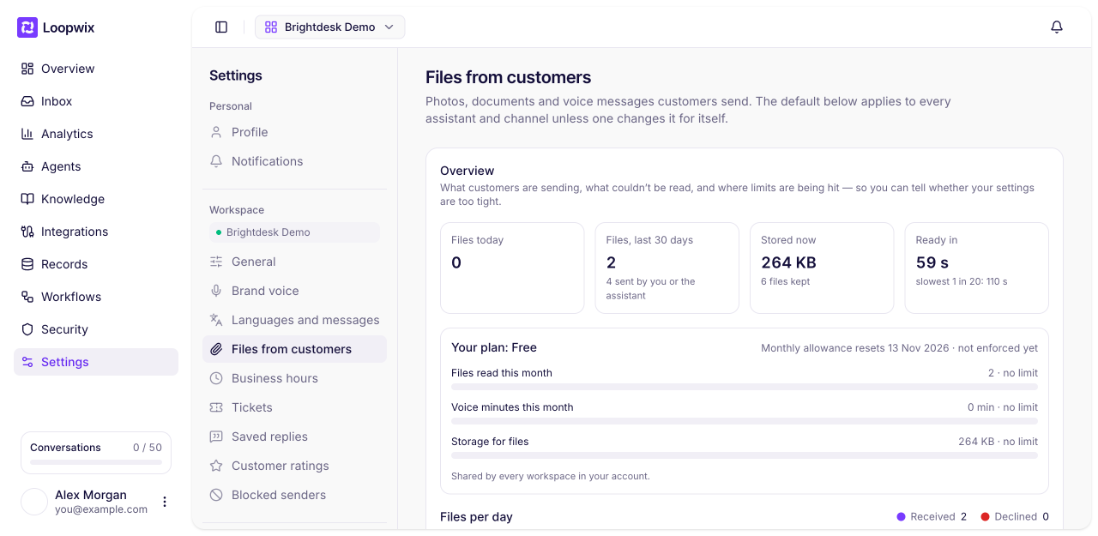
Overview
The Overview shows what customers are sending, what could not be read and where limits are being hit:
- Files today, Files, last 30 days, Stored now and Ready in (how long files take to be read).
- Files per day, received versus declined.
- Declined at the door and Accepted but couldn't be read, by reason.
- By kind and By channel.
Choose the last 7, 30 or 90 days.
Plan allowances
Your plan sets monthly Files read, Voice minutes and Storage for files. Usage appears on the Usage page; the Usage page says when an allowance is not enforced yet.
Privacy
Customer files can contain personal data. Review Data, secrets and privacy and set a retention period you are comfortable with.
How languages work
Choose your languages and tone, read the language quality labels honestly, understand knowledge in other languages, and use translation in the Inbox.
Developers
Embed the Loopwix chat in a site or app with one script, control it from JavaScript and understand keys, allowed sites and mount modes.