
Connect Telegram to your AI agent
Create a Telegram bot with BotFather, paste its token into Loopwix, and chat with your AI agent on Telegram in about five minutes. Beta.
Telegram is the easiest channel: no business verification, no review and no 24-hour reply window.
How do I connect Telegram to my AI agent?
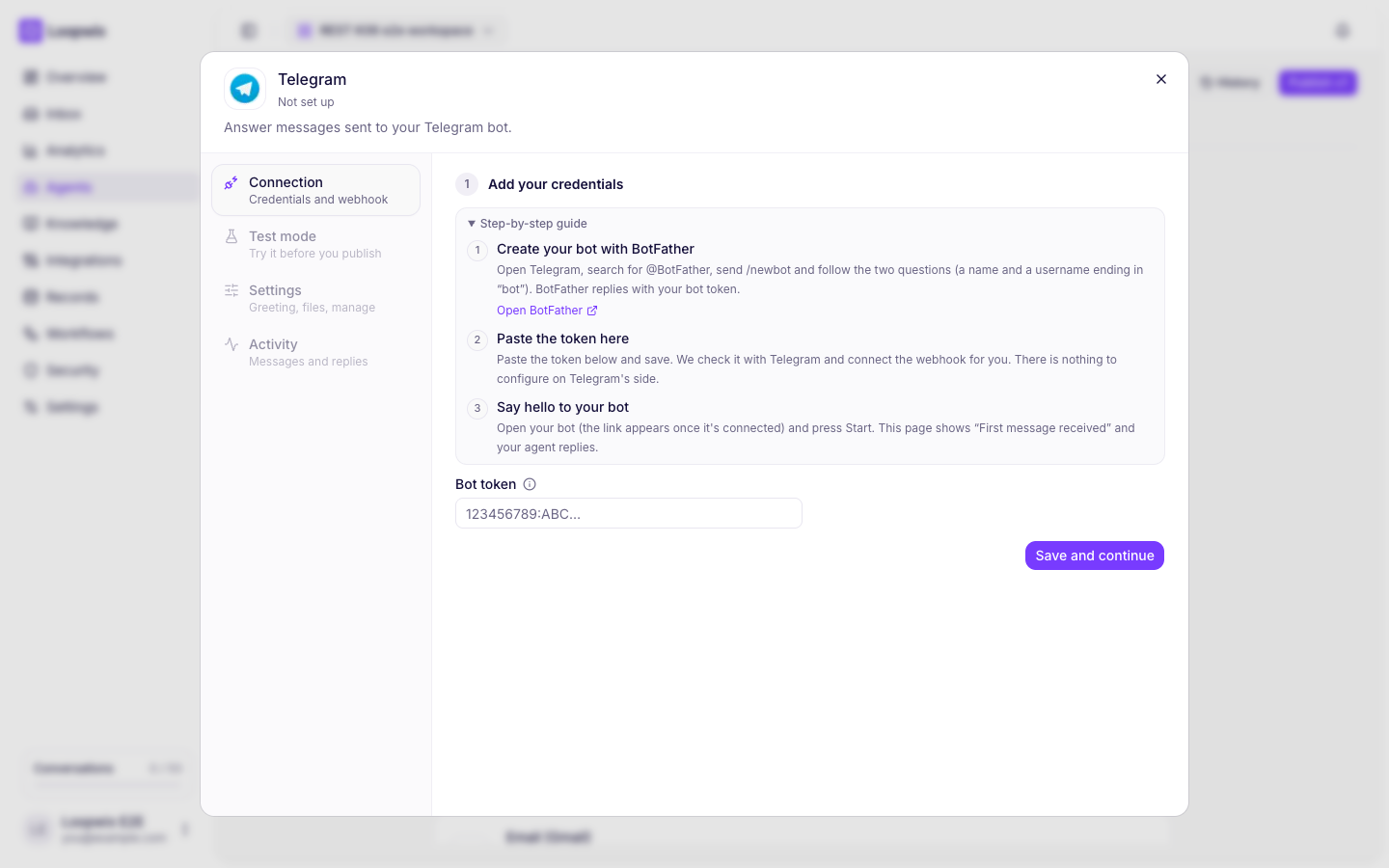
In Telegram, open @BotFather, send /newbot and copy the bot token it gives you. In Loopwix, open the agent's Channels section, choose Telegram and paste the token. It takes about five minutes, with no business verification and no 24-hour reply window. Telegram is in beta.
Steps
- In Telegram open @BotFather and send
/newbot. Choose a name and a username ending inbot. - Copy the bot token BotFather gives you.
- In Loopwix open the agent → Channels → Telegram, paste the Bot token and select Save and continue.
- Loopwix checks the token and registers the webhook for you. If your deployment has no public https address it tells you.
- Open your bot in Telegram, press Start, and say hello. Use test mode before you publish; testers are identified by their numeric chat ID (a bot such as @userinfobot shows yours).
Optional in BotFather
/setdescription, /setuserpic and /setcommands improve how the bot looks. Loopwix answers private chats only. Group chats and channels are ignored, so /setprivacy does not change anything for Loopwix.
What customers can do on Telegram
Customers find your bot by its username or a t.me link, press Start and type. They get the same agent as on your website chat. They can:
- Ask questions and get answers from your published knowledge.
- Verify their email by typing a 6-digit code into the chat, then ask about their own orders or bookings.
- Confirm or cancel an action by tapping Yes or No under the message.
- Send photos, documents and voice notes, once you turn files on for the connection.
- Ask for a person. Hand-over is switched on by Loopwix on request; see Set up escalation.
A short example:
Customer: /start
Agent: Hi! I'm the Acme assistant. How can I help?
Customer: What are your opening hours on Saturday?
Agent: We're open from 9:00 to 14:00 on Saturdays.
Loopwix treats /start as a hello, so the agent greets the customer in its own words. Telegram has no 24-hour reply window, so your team can reply to a hand-over at any time.
What Loopwix can access
The bot token gives Loopwix control of that one bot, and nothing else in your Telegram account. Loopwix uses it to:
- check the token and read the bot's name;
- point the bot's webhook at Loopwix, protected by a secret only Loopwix and Telegram know;
- receive messages sent to the bot in private chats, and send the replies.
Loopwix cannot read your personal chats or other bots. The token is stored encrypted. If it ever leaks, revoke it in BotFather with /revoke and paste the new one.
Tips and limits
- Files: bots can only download files up to 20 MB. Albums are read together.
- Message length: a reply can be up to 4,096 characters. Longer answers are split.
- No window: there is no 24-hour limit, and no Meta-style review or verification.
- Customers start first: a Telegram bot cannot message someone who has never pressed Start.
- Hand-over works like any channel: a ticket appears in the Inbox.
Telegram's bot features guide explains BotFather and every bot setting.
Does the Telegram bot work in group chats?
No. Loopwix answers private chats with the bot only. Messages in groups and channels are ignored.
Do I need business verification for Telegram?
No. Telegram has no business verification or app review. Anyone can create a bot with BotFather in a few minutes.
Can I use an existing bot?
Yes. Paste its token in Loopwix. Loopwix replaces the bot's webhook, so any other service that used the same bot stops receiving its messages.
How do I find a tester's chat ID?
Ask the tester to message a bot such as @userinfobot, which replies with their numeric ID. Add that number to the test list.
Troubleshooting
| Symptom | Fix |
|---|---|
| "Only delivers to https" | The deployment needs a public https address |
| No reply | Check Activity; make sure the agent is published or you are on the test list |
| Token rejected | Create a new token in BotFather and paste it again |
Messaging channels: how setup works
The setup panel shared by Telegram, WhatsApp, Messenger, Instagram and Gmail: credentials, webhook, test mode, activity, files and go-live steps.
Connect WhatsApp through Meta Cloud API: create the app, a permanent token, paste the credentials, set the webhook and go live with a real number.