
Messages and visitor features
Control ratings, sources, notification sound, file uploads and their limits, conversation history and a proactive message.
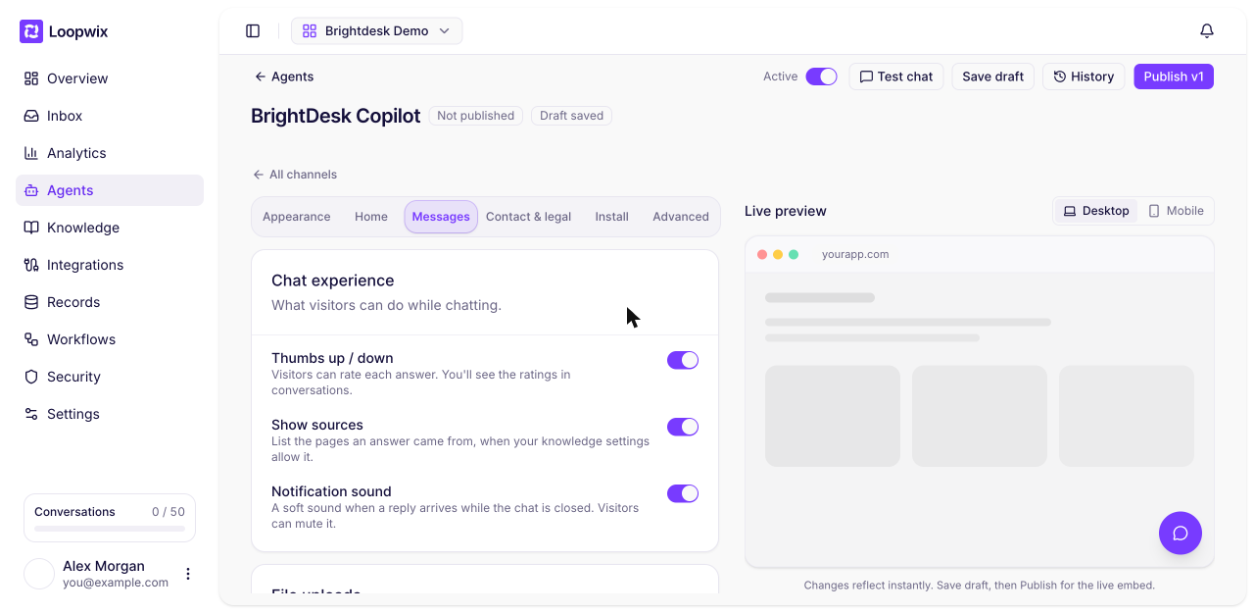
Open the Messages tab ("Chat experience: what visitors can do while chatting").
| Setting | Meaning |
|---|---|
| Thumbs up / down | Visitors can rate each answer. You see the ratings in conversations |
| Show sources | Lists the pages an answer came from, when your knowledge settings allow it; see Citation modes |
| Notification sound | A soft sound when a reply arrives while the chat is closed. Visitors can mute it |
| File uploads | Visitors send documents in the chat. Files are scanned for viruses, read by your assistant, and kept for a limited time |
| Conversation history | Keep conversation history lets returning visitors pick up where they left off; Forget history is After tab closed or Never |
| Proactive message | A small bubble next to the chat button that invites people to ask |
File uploads
File uploads are off for the whole workspace by default. You can set everything up here and it is saved. Customers still cannot send files until you turn them on in Settings → Files from customers. In the studio you then choose Let customers send files and which kinds are welcome. The kinds are Documents (PDF, Word, Excel, PowerPoint and text), Images, and Voice messages, which the assistant reads as a transcript.
Per-chat limits each have a default shown in the studio. They cover files in one chat, total size in one chat, files per person per hour, and how many days to keep files. You also choose When a limit is reached (for example reply and carry on in text). Save with Save file settings; Reset to default restores defaults.
Save draft, then publish the agent.
Customise
Choose where the Loopwix website chat appears, design its home screen and starters, add contact and legal links, and share it on a page of its own.
Advanced: allowed sites, protection, switch off
Limit which sites can load the Loopwix website chat, slow down abusive visitors, block IP addresses, or switch the chat off everywhere at once.