
Workspace settings
Set your Loopwix workspace name, type, language, time zone and knowledge defaults, and define the brand voice that every agent in it follows.
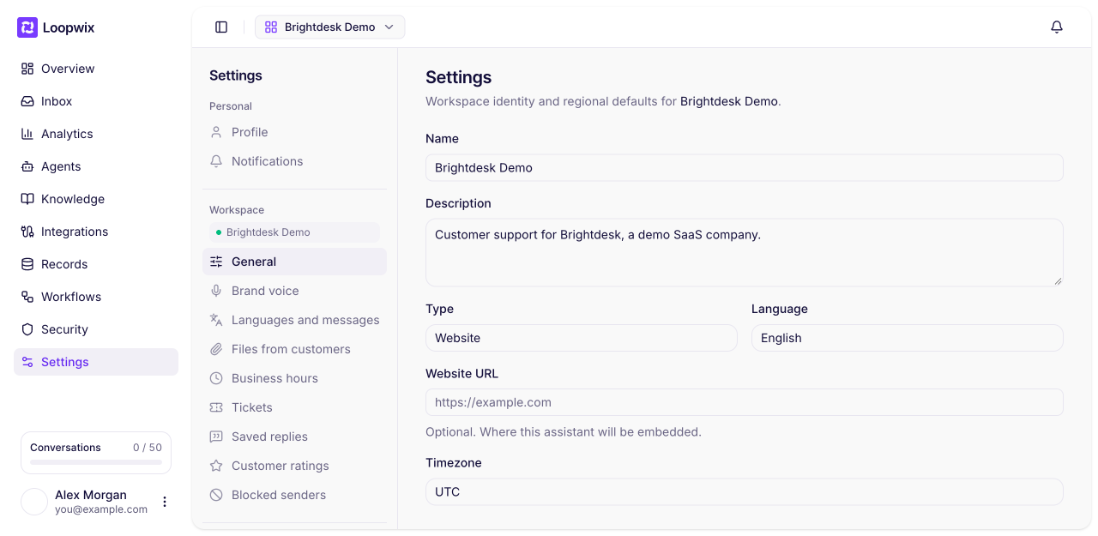
Open Settings → Workspace → General (Admin and above).
How do I set a brand voice for all my agents?
Open Settings, then Workspace, then Brand voice. Describe how your business sounds, and list words and phrases to use or avoid. Every agent in the workspace follows the brand voice on top of its own instructions. Name, language and time zone are under General. You need the Admin role or higher.
General
| Field | What it does |
|---|---|
| Name, Description | How the workspace is shown in the selector and settings |
| Type | Website, SaaS product, Business or Project |
| Language | The workspace's default language (for example English, Spanish, French, German, Portuguese, Italian, Dutch, Sinhala, Tamil) |
| Website URL | Optional: where this assistant will be embedded |
| Timezone | Used for analytics days and schedules (UTC, US zones, London, Paris, Dubai, India, Colombo, Singapore, Sydney) |
Knowledge defaults
| Setting | Meaning |
|---|---|
| Default citation mode | Answer only, Title, Excerpt or Link: how sources show under answers, applied to new uploads that have no override. See Citation modes |
| Max sources per answer | Cap on sources shown (1 to 10) |
| Answer depth (RAG mode) | Fast (quick answers), Balanced (deeper path for complex questions) or Strict (always verify before answering; best for regulated workspaces) |
Select Save changes.
Brand voice
Settings → Workspace → Brand voice: "How your business sounds. Every agent in this workspace follows it, on top of its own instructions."
| Field | Example |
|---|---|
| Tone | warm, plain-spoken, a little playful. Never pushy |
| Words and phrases to use | One per line |
| Words and phrases to avoid | One per line |
| Examples of how you'd say it | One short example per line (up to 6) |
Publish your agents after changes so the new voice applies (Publish).
Workspace and team
How Loopwix accounts, workspaces and agents fit together, and how to set workspace defaults, invite people, choose roles and teams, and edit your profile.
Create, switch and pause workspaces
Add a Loopwix workspace for another brand, location or client, switch between workspaces, and pause one without losing any of its data.